EducationSoftwareStrategy.com
StrategyCommunity

Knowledge Base

Product

Community

Knowledge Base

TopicsBrowse ArticlesDeveloper Zone

Product

Download SoftwareProduct DocumentationSecurity Hub

Education

Tutorial VideosSolution GalleryEducation courses

Community

GuidelinesGrandmastersEvents
x_social-icon_white.svglinkedin_social-icon_white.svg
Strategy logoCommunity

© Strategy Inc. All Rights Reserved.

LegalTerms of UsePrivacy Policy
  1. Home
  2. Topics

KB39348: MicroStrategy Object Manager 9.4.x-10.x does not appear to be writing events to a new log file despite configuring it through MicroStrategy Diagnostics and Performance Logging 9.2.x - 9.3.x


Community Admin

• Strategy


This article explains how to reconfigure MicroStrategy Object Manager 9.4.x-10.x to log events to a new log file.

SYMPTOM:
By default, Strategy Object Manager 9.4.x-10.x logs events into the DSSErrors.log file. Consider that Strategy Object Manager 9.4.x-10.x needs to be configured to log events to a new log file. In order to do so, user goes into Tools > Object Manager Preferences:
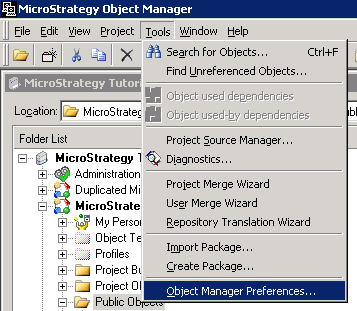
ka04W000000OhqFQAS_0EM440000002DKo.png

Then Object Manager > Events > Configure Logging, and enables logging to a new file called 'SMLog' from Strategy Diagnostics and Performance Logging 9.4.x-10.x as shown:
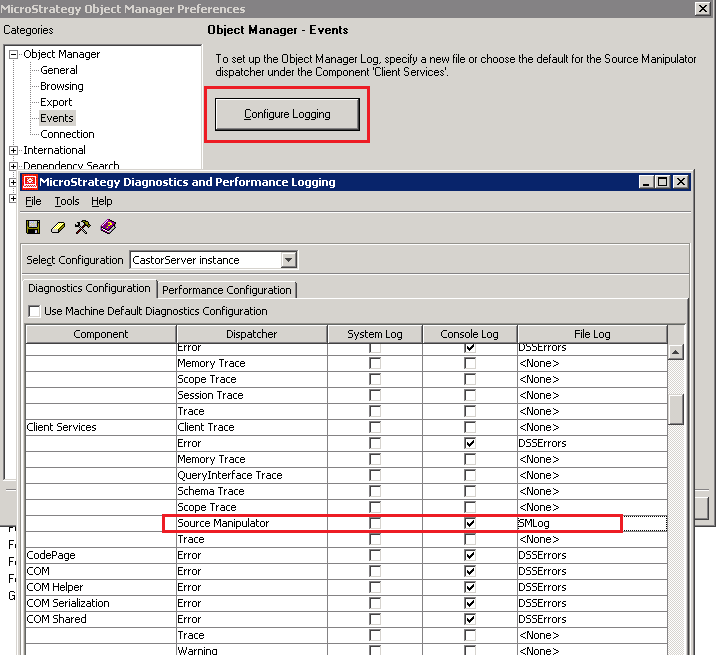
ka04W000000OhqFQAS_0EM440000002DKg.png

 
A new file called 'SMLog.log' gets created in the <MSTR_LOG> directory, but the Strategy Object Manager 9.4.x-10.x events continue to be logged into the DSSErrors.log file.
CAUSE:
The user should consider two things here:
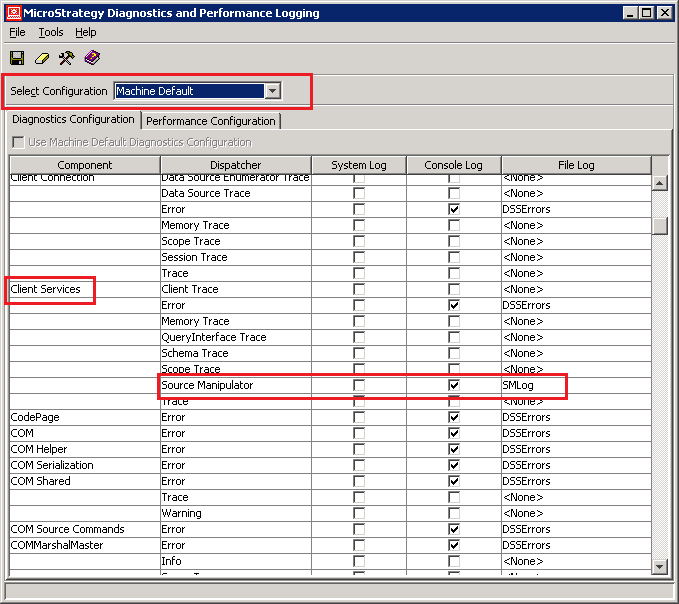
  • The Client Services > Source Manipulator entry in Strategy Diagnostics and Performance Logging 9.4.x-10.x needs to be changed for the 'Machine Default' configuration on the Strategy Object Manager 9.4.x-10.x client machine (and not 'CastorServer instance' configuration) as shown:
ka04W000000OhqFQAS_0EM440000002DKk.png
  • This is irrespective of whether the Strategy Object Manager 9.4.x-10.x operations are to be carried out in 2-tier or 3-tier mode. The log entries are written by the client Strategy Object Manager 9.4.x-10.x machine.
     
  • Once the change is made, Strategy Object Manager 9.4.x-10.x needs to be restarted for it to take effect. 

ACTION:
The user should ensure that the above two points were considered for the logging to the new file to take place successfully. 


Comment

0 comments

Details

Knowledge Article

Published:

April 11, 2017

Last Updated:

April 11, 2017