EducationSoftwareStrategy.com
StrategyCommunity

Knowledge Base

Product

Community

Knowledge Base

TopicsBrowse ArticlesDeveloper Zone

Product

Download SoftwareProduct DocumentationSecurity Hub

Education

Tutorial VideosSolution GalleryEducation courses

Community

GuidelinesGrandmastersEvents
x_social-icon_white.svglinkedin_social-icon_white.svg
Strategy logoCommunity

© Strategy Inc. All Rights Reserved.

LegalTerms of UsePrivacy Policy
  1. Home
  2. Topics

KB39387: Zoom level is lost after saving ESRI/Google Map Report or Report Service Document in MicroStrategy Web 9.4.1 and above.


Community Admin

• Strategy


Zoom level is lost after saving ESRI/Google Map Report or Report Service Document in MicroStrategy Web 9.4.1 and above.

SYMPTOM:
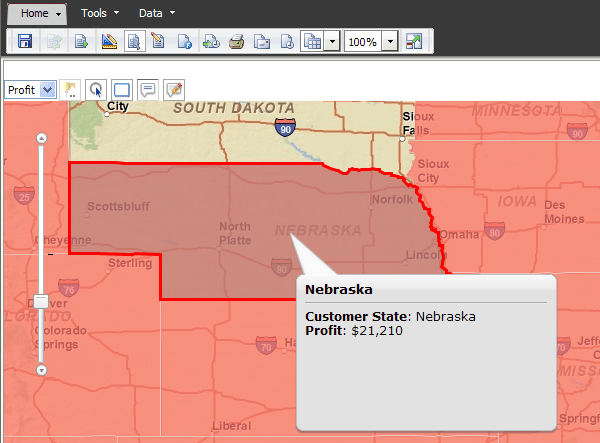
Currently, users cannot save a zoom level for GIS Connector Map Report or Report Services Document in Strategy Web 9.4.1 and above for either ESRI Map or Google Map.
 
If user set the zoom level to certain state "Nebraska" for example,
ka04W000000OaWqQAK_0EM4400000027GB.png

 
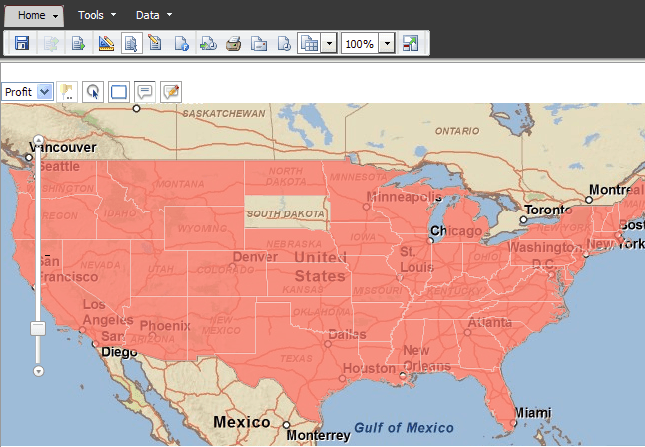
After saving the report, and re-open it, the zoom level become default and the US country level map loads again.  
ka04W000000OaWqQAK_0EM4400000027GD.png

 
CAUSE:
This has been logged as an enhancement so the zoom level is saved on report properties.  
 
ACTION:
Strategy will continue to investigate and post updates as soon as they are available.
KB39387


Comment

0 comments

Details

Knowledge Article

Published:

May 22, 2017

Last Updated:

November 12, 2018