SYMPTOMS:
The Strategy Intelligence Server maintains multiple caches - a single object cache of configuration objects (such as users and projects etc) and individual caches per project of regular project objects. When users create, modify or delete a object in a project from 2-tier mode (without going through the Intelligence Server), the information is not updated to the Strategy Intelligence Server which will continue to use the cached version it may hold in memory. Users who connect to Strategy Intelligence Server (in 3-tier mode) may also not see changes if an object in a project is modified using a customized application that directly affects the metadata.
CAUSE:
Strategy Intelligence Server users read the information from the server-side object cache which is not updated by changes made in 2 - tier mode.
ACTION:
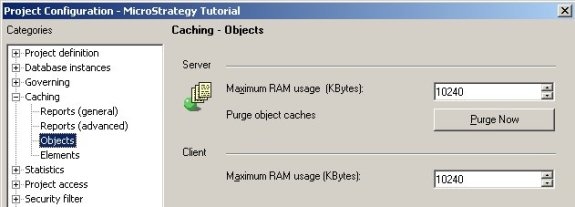
Users should avoid making changes to the metadata directly in two - tier mode when an Intelligence Server is connected to the same metadata. Strategy strongly recommends making all changes in three tier mode to preserve object integrity. It is however possible for three tier users to view any newly modified objects by performing a purge of the object caches. This may be done for project objects by opening the Project Configuration > Caching > Objects in Strategy Desktop and clicking on the 'Purge Now' button in the Server Object cache section.
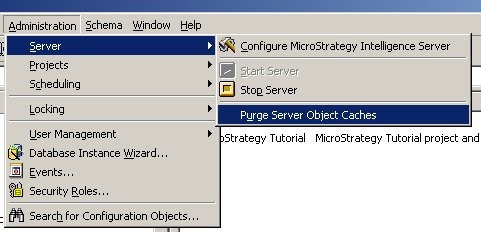
Intelligence Server configuration object cache may be purged directly from the Administration menu in Strategy Desktop as shown below:
NOTE: Additionally two-tier users also have an object cache provide through Strategy Desktop independent of the Intelligence Server cache. Closing and reopening Strategy Desktop will be sufficient to refresh any new objects created three-tier mode. Also users should use the purge options as infrequently as possible because of the significant performance impact of this operation.
