EducationSoftwareStrategy.com
StrategyCommunity

Knowledge Base

Product

Community

Knowledge Base

TopicsBrowse ArticlesDeveloper Zone

Product

Download SoftwareProduct DocumentationSecurity Hub

Education

Tutorial VideosSolution GalleryEducation courses

Community

GuidelinesGrandmastersEvents
x_social-icon_white.svglinkedin_social-icon_white.svg
Strategy logoCommunity

© Strategy Inc. All Rights Reserved.

LegalTerms of UsePrivacy Policy
  1. Home
  2. Topics

KB39435: "Collection does not permit elements of this type" error message appears when clicking on a Link to report to answer dynamically the target report prompts in MicroStrategy Developer 9.4.1 and 10.x.


Stefan Zepeda

Salesforce Solutions Architect • Strategy


In MicroStrategy Developer 9.4.1 and 10.x, users encounter an error when clicking on a report link to answer target report prompts dynamically. The prompts are based on the parent report page-by attributes with the page-by Total enabled. 

SYMPTOM:
 
In Strategy Developer 9.4.1 and 10.x, users encounter an error when clicking on a report link to answer target report prompts dynamically. The prompts are based on the parent report page-by attributes with the page-by Total enabled. 
 

ka02R000000kVqcQAE_0EM440000002MT5.png


Collection does not permit elements of this type

STEPS TO REPRODUCE:
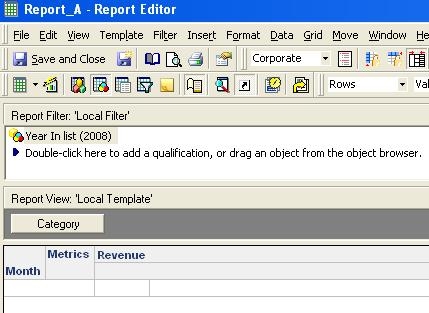
Follow the steps below to reproduce this issue using the Strategy Tutorial Project:


ka02R000000kVqcQAE_0EM440000002DIZ.jpeg
  • Create a new report adding:
    • The attributes Month to the rows and Category to the Page-By.
    • The metric Revenue to the columns.
    • A filter based on the criteria: Year = 2008 to the local report filter area.
    • Enable the Total available in the menu Data > Subtotal > Total. 
    • Save and close this report as Report_A. The final report layout should be similar to: 
       
       
ka02R000000kVqcQAE_0EM440000002DIP.jpeg
  • Create a second report adding:
    • The attributes Month and Subcategory to the rows.
    • The metric Revenue to the columns.
    • Two local report filters: (i) Attribute Element List Prompt based on the attribute Category; (ii) Attribute Element List Prompt based on the attribute Month.
    • Save and close this report as Report_B. The final report layout should be similar to:
       
ka02R000000kVqcQAE_0EM440000002DIV.jpeg
  • Edit the report Report_A:
    • Right click on the attribute Month.
    • Select Edit Links option.
    • Click on the button from Combo Box Run this report or document.
    • Browse for the report Report_B.
    • In the Combo Box Select prompt answer method, set the option Answer dynamically for both prompts as shown:
  • Execute Report_A, select Total on the page-by, right click on any element from Month, select the option Link and click on Link1, as shown:  
     
            
ka02R000000kVqcQAE_0EM440000002DIU.jpeg
  • The message error that follows is displayed:
ka02R000000kVqcQAE_0EM440000002DIR.jpeg

CAUSE:
This message is thrown due to the page-by attribute elements are not passed dynamically to the target report via link. An enhancement request has been logged to add all the page-by attribute elements embedded into the link.
 
ACTION:
Contact the Strategy Technical Support for an update on this Enhancement Request.


Comment

0 comments

Details

Knowledge Article

Published:

May 22, 2017

Last Updated:

May 22, 2017