EducationSoftwareStrategy.com
StrategyCommunity

Knowledge Base

Product

Community

Knowledge Base

TopicsBrowse ArticlesDeveloper Zone

Product

Download SoftwareProduct DocumentationSecurity Hub

Education

Tutorial VideosSolution GalleryEducation courses

Community

GuidelinesGrandmastersEvents
x_social-icon_white.svglinkedin_social-icon_white.svg
Strategy logoCommunity

© Strategy Inc. All Rights Reserved.

LegalTerms of UsePrivacy Policy
  1. Home
  2. Topics

KB39453: How to set a value for incremental fetch in MicroStrategy Office


Community Admin

• Strategy


There are three possible methods to choose from: Smart Fetch, Manual Fetch, and Preview. Regardless of which of these options are chosen, the value set in the input field for number of rows determines the incremental fetch value.
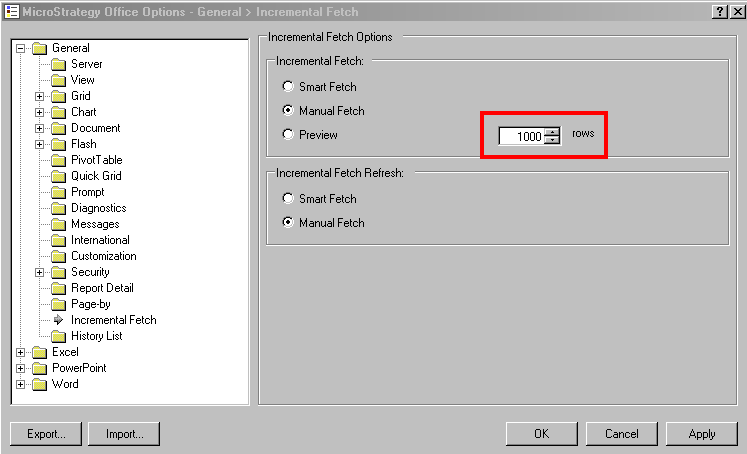
Incremental fetch settings are found in the Office Options at General > Incremental Fetch dialog.
 
As shown below, there are three possible methods to choose from: Smart Fetch, Manual Fetch, and Preview. Regardless of which of these options are chosen, the value set in the input field for number of rows determines the incremental fetch value.
 

ka04W000000OdalQAC_0EM4400000027GE.png


Comment

0 comments

Details

Knowledge Article

Published:

June 21, 2017

Last Updated:

June 21, 2017