EducationSoftwareStrategy.com
StrategyCommunity

Knowledge Base

Product

Community

Knowledge Base

TopicsBrowse ArticlesDeveloper Zone

Product

Download SoftwareProduct DocumentationSecurity Hub

Education

Tutorial VideosSolution GalleryEducation courses

Community

GuidelinesGrandmastersEvents
x_social-icon_white.svglinkedin_social-icon_white.svg
Strategy logoCommunity

© Strategy Inc. All Rights Reserved.

LegalTerms of UsePrivacy Policy
  1. Home
  2. Topics

KB39455: How to change the thread priority which reports run on the database instance from the default of 'Low' in MicroStrategy Developer


Stefan Zepeda

Salesforce Solutions Architect • Strategy


The following procedure describes how to change the default thread priority on the database instance for newly running reports.
 
Step 1:
 
Open the database instance from Strategy Developer Project Source > Administration > Configuration Managers > Database Instances and select “New”.
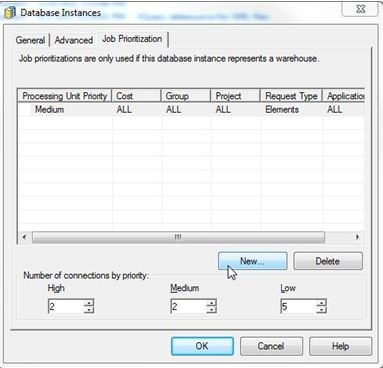
 

ka02R000000kVZdQAM_0EM440000002JFm.jpeg

 
Step 2:
 
Proceed through the wizard and select “Request type” for the “Set job priority by”.
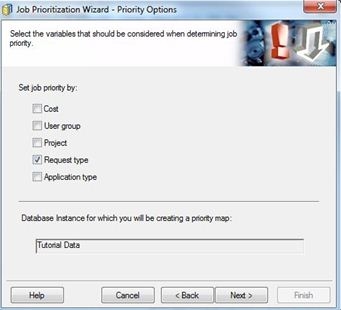
 

ka02R000000kVZdQAM_0EM440000002JFh.jpeg

 
Step 3:
 
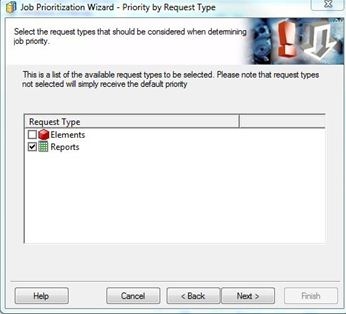
Select Reports.
 

ka02R000000kVZdQAM_0EM440000002JFl.jpeg

 
Step 4:
 
Set the “Processing Unit Priority” to “Medium” or "High".  With this set to medium, all reports which are executed will be run at a medium priority.
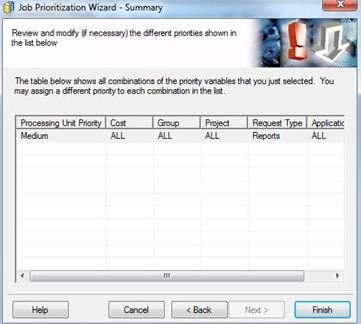
 

ka02R000000kVZdQAM_0EM440000002JFk.jpeg


Comment

0 comments

Details

Knowledge Article

Published:

May 31, 2017

Last Updated:

May 31, 2017