SYMPTOM:
Users may notice that after adding a table to the Warehouse catalog, and modeling one or more attributes or facts on that table, when running a report based of all the attributes, the aggregation function is not applied to the fact for the metric calculation.
CAUSE:
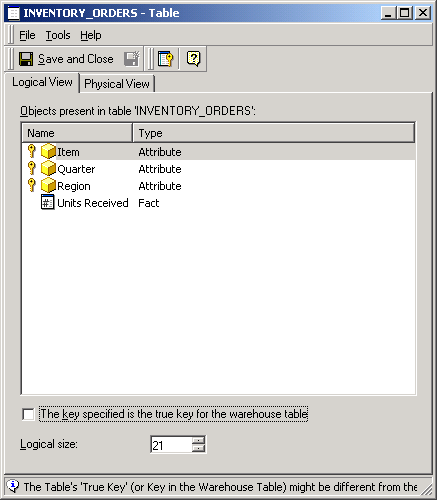
As an example consider the the Strategy Tutorial warehouse and metadata, the lowest level for the INVENTORY_ORDERS fact table is Item, Quarter and Region. Every combination of these three attributes should return, at most, one row of data; therefore, in a report that has these three attributes and one metric, the Strategy SQL Generation Engine executes the following:
This is a performance optimization.
To demonstrate, the Strategy SQL Generation Engine generates the following SQL for a report in Tutorial that requests the sum of units received for each Item, Quarter and Region (lowest level of INVENTORY_ORDERS):
select    distinct a24.[REGION_ID] AS REGION_ID,
    a24.[REGION_NAME] AS REGION_NAME,
    a23.[QUARTER_ID] AS QUARTER_ID,
    a23.[QUARTER_DESC] AS QUARTER_DESC,
    a22.[ITEM_ID] AS ITEM_ID,
    a22.[ITEM_NAME] AS ITEM_NAME,
    a21.[UNITS_RECEIVED] as UNITS
from    [INVENTORY_ORDERS]    a21,
    [LU_ITEM]    a22,
    [LU_QUARTER]    a23,
    [LU_REGION]    a24
where    a21.[ITEM_ID] = a22.[ITEM_ID] and
     a21.[QUARTER_ID] = a23.[QUARTER_ID] and
     a21.[REGION_ID] = a24.[REGION_ID]
select    a24.[REGION_ID] AS REGION_ID,
    max(a24.[REGION_NAME]) AS REGION_NAME,
    a23.[QUARTER_ID] AS QUARTER_ID,
    max(a23.[QUARTER_DESC]) AS QUARTER_DESC,
    a22.[ITEM_ID] AS ITEM_ID,
    max(a22.[ITEM_NAME]) AS ITEM_NAME,
    sum(a21.[UNITS_RECEIVED]) as UNITS
from    [INVENTORY_ORDERS]    a21,
    [LU_ITEM]    a22,
    [LU_QUARTER]    a23,
    [LU_REGION]    a24
where    a21.[ITEM_ID] = a22.[ITEM_ID] and
     a21.[QUARTER_ID] = a23.[QUARTER_ID] and
     a21.[REGION_ID] = a24.[REGION_ID]
group by    a24.[REGION_ID],
    a23.[QUARTER_ID],
    a22.[ITEM_ID]
NOTES:
When the primary lookup table for an attribute is defined from a fact table, the steps above may be necessary to avoid element-browsing requests from returning duplicate elements.
