EducationSoftwareStrategy.com
StrategyCommunity

Knowledge Base

Product

Community

Knowledge Base

TopicsBrowse ArticlesDeveloper Zone

Product

Download SoftwareProduct DocumentationSecurity Hub

Education

Tutorial VideosSolution GalleryEducation courses

Community

GuidelinesGrandmastersEvents
x_social-icon_white.svglinkedin_social-icon_white.svg
Strategy logoCommunity

© Strategy Inc. All Rights Reserved.

LegalTerms of UsePrivacy Policy
  1. Home
  2. Topics

KB39481: Telnet does not work from the machine where MicroStrategy Health Center Master Agent is installed to the machine with Agent configured


Community Admin

• Strategy


One of the initial troubleshooting steps for Strategy Health Center Master Agent to connect Agent is to make users can Telnet from the Master Agent to Agents. Use the following check list to ensure that the machines are ready to test Telnet.

  • Do you have Telnet Client feature enabled on the machine where Master Agent is installed?
     
    For Windows 7, this feature can be enabled from Control Panel > All Control Panel Items > Programs and Features > Turn Windows features on or off.
     
ka04W000000OfhXQAS_0EM440000002N4I.jpeg
  • For Agent machine, make sure that Telnet Service is started. Go to Services > Telnet.
     
ka04W000000OfhXQAS_0EM440000002N4G.jpeg
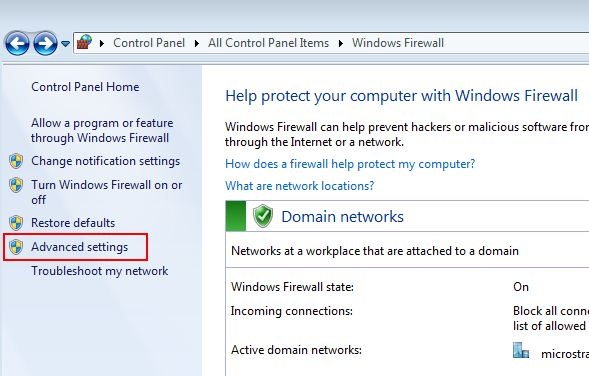
  • Make sure that Port specified for the Agent is open. In Windows 7, the port can be open by going to: Control Panel > All Control Panel Items > Windows Firewall > Advanced settings
     
ka04W000000OfhXQAS_0EM440000002N4L.jpeg
  •  
    Follow the wizard to open a specific port or all port as required.
     
ka04W000000OfhXQAS_0EM440000002N4T.jpeg
  •  
    For more information about what port number can be used by Strategy Health Center Agent, please see:

    KB32554: How to Configure a Strategy Health Center system.

  • When testing Telnet, make sure to launch the command prompt as "Administrator," if you did not login to the machine as a true "Administrator."

ka04W000000OfhXQAS_0EM440000002N4S.jpeg
  • Otherwise, you may see an error like this:
     

    Sample Code/Error
    'telnet' is not recognized as an internal or external command, operable program or batch file.

     
ka04W000000OfhXQAS_0EM440000002N4K.jpeg


Note: This document is written for the convenience for Strategy Technical Support Engineer to troubleshoot a basic network issue. When the customer encounter this problem -- Telnet to the agent does not work --, they, Technical Support Engineer should suggest customer to work with their Network and/or System Administrator to resolve the issue because their network/system security policy may be different from ours and the change like this may raise some security concern.


Comment

0 comments

Details

Knowledge Article

Published:

September 28, 2017

Last Updated:

September 28, 2017