EducationSoftwareStrategy.com
StrategyCommunity

Knowledge Base

Product

Community

Knowledge Base

TopicsBrowse ArticlesDeveloper Zone

Product

Download SoftwareProduct DocumentationSecurity Hub

Education

Tutorial VideosSolution GalleryEducation courses

Community

GuidelinesGrandmastersEvents
x_social-icon_white.svglinkedin_social-icon_white.svg
Strategy logoCommunity

© Strategy Inc. All Rights Reserved.

LegalTerms of UsePrivacy Policy
  1. Home
  2. Topics

KB39504: In MicroStrategy Web, performing a search in a hierarchy prompt brings back all results containing the item(s) being searched, and not just the specific item.


Community Admin

• Strategy


In MicroStrategy Web, performing a search in a hierarchy prompt brings back all results containing the item(s) being searched, and not just the specific item. This might not be desirable to some users, especially if a large number of items is being returned, and may be inconvenient in terms of loading times and performance.

SYMPTOM:
In Strategy Web 9.2.x, performing a search in a hierarchy prompt brings back all results containing the item(s) being searched, and not just the specific item. This might not be desirable to some users, especially if a large number of items is being returned, and may be inconvenient in terms of loading times and performance.
STEPS TO REPRODUCE:
In Strategy Tutorial Web 9.2.1:

  • Create a 'hierarchy qualification prompt' using the 'Products' hierarchy
  • Create a grid report and insert the above hierarchy prompt and execute the report
  • In the prompt window, select the 'Item' attribute and search for the number "1" in the search box: you will see that all attribute elemnts containing the number "1" are returned
     
ka04W000000OeO9QAK_0EM4400000027GF.png

 
CAUSE:
This is working as designed. The search brings back the results that 'CONTAINS' the string and it not an 'EQUALS' search.
ACTION:
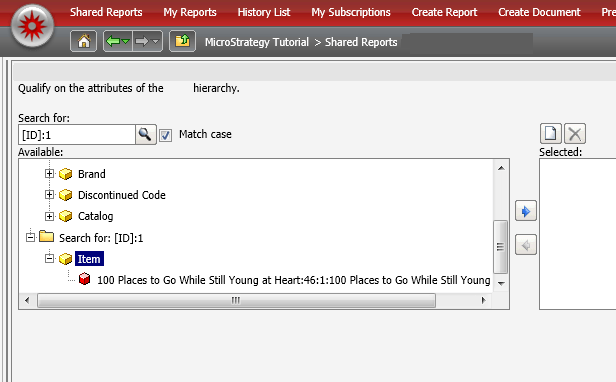
If users want to limit the results being returned and bring back the specific item being searched for, they could use form based search, e.g. search for :1 and the only entry with Attribute form ID = 1 will be returned.
 

ka04W000000OeO9QAK_0EM4400000027GP.png


Comment

0 comments

Details

Knowledge Article

Published:

June 9, 2017

Last Updated:

June 9, 2017