SYMPTOM:
After the plugin IncludingPromptOnDocument is deployed the following error message appear when adding a Panel Stack in a document in Strategy 9.2.1:

STEPS TO REPRODUCE:
Step 1.
Deploy the plugin IncludingPromptOnDocument
Step 2.
Create a dataset in Strategy Tutorial with:
Step 3.
Add the dataset to a Document
Step 4.
Run the document.
The Strategy tool bar displays the IncludingPromptOnDocument customization button and the document can be executed successfully as shown below:

Step 5.
Insert a panel stack in the document and a JavaScript error is displayed as shown below:
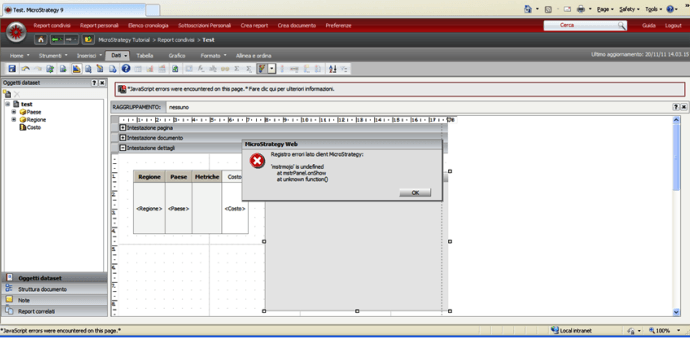
Strategy client-side error log
'mstrmojo' is undefined
at mstrPanel.onShow
at unknown function()
After the error is generated both Fiddler and the Web log file don't log anything.
CAUSE:
The error occurs because the RW_Links.aspx file needs to be modified.
ACTION:
Locate the RW_Links.aspx file in Web ASPx\plugins\IncludingPromptOnDocument\asp.
Open the RW_Links.ascx and add the following lines at the beginning of the file as shown below:
<%@ Control Language="vb" AutoEventWireUp="false" CodeFile="RW_Links.ascx.vb" Inherits="Strategy.RW_Links"%>
<%@ Register TagPrefix="web" Namespace="Strategy.Tags"%>
<web:resource runat="server" type="javascript" name="../javascript/mojo/js/source/mstrmojo.js"/>
<web:include runat="server" flush="false" id="webinclude1" />
Save the file and restart the Web Server.
WARNING:
This customization is provided as a convenience to Strategy users and is only directly applicable to the version stated. While this code may apply to other releases directly, Strategy Technical Support makes no guarantees that the code provided will apply to any future or previous builds. In the event of a code change in future builds, Strategy may not be able to provide additional code on this matter even though this customization is provided at this time for this specific build.
