EducationSoftwareStrategy.com
StrategyCommunity

Knowledge Base

Product

Community

Knowledge Base

TopicsBrowse ArticlesDeveloper Zone

Product

Download SoftwareProduct DocumentationSecurity Hub

Education

Tutorial VideosSolution GalleryEducation courses

Community

GuidelinesGrandmastersEvents
x_social-icon_white.svglinkedin_social-icon_white.svg
Strategy logoCommunity

© Strategy Inc. All Rights Reserved.

LegalTerms of UsePrivacy Policy
  1. Home
  2. Topics

KB39535: Redundant zero labels are displayed on a graph report when selecting the "Show Total" option in Graph Options in MicroStrategy Developer 9.x and 10.x


Stefan Zepeda

Salesforce Solutions Architect • Strategy


Redundant zero labels are displayed on a graph report when selecting the "Show Total" option in Graph Options in MicroStrategy Developer 9.x and 10.x

SYMPTOM:
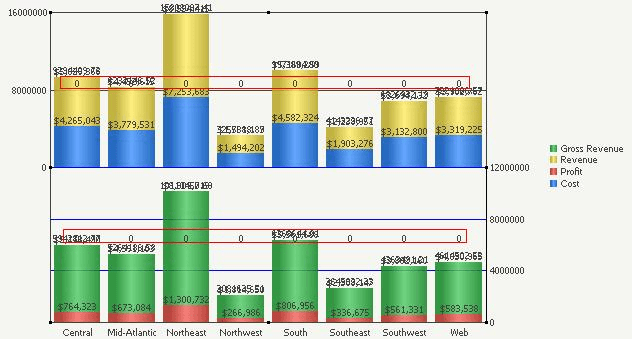
In Strategy Developer 9.x and 10.x, redundant zero labels are displayed on a graph report when selecting the "Show Total" option in Graph Options, as shown below:
 

ka02R000000kVb8QAE_0EM440000002DKn.png


STEPS TO REPRODUCE:
Follow the steps below to reproduce the issue with the Strategy Tutorial Project:
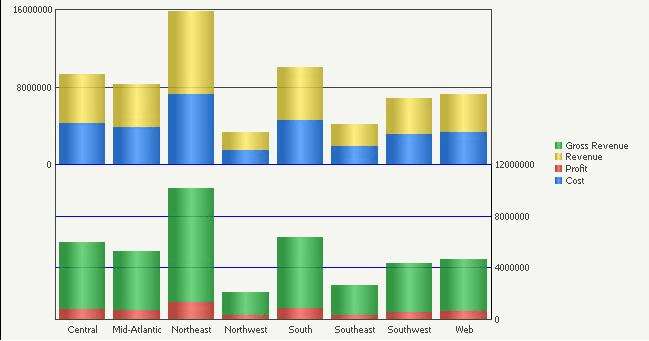
  • Create a report with one attribute in the row and four metrics in the column.
  • Run the report in Graph view mode and set the graph type to "Vertical Bar:Bipolar Stacked", as shown below:

ka02R000000kVb8QAE_0EM440000002DKl.png
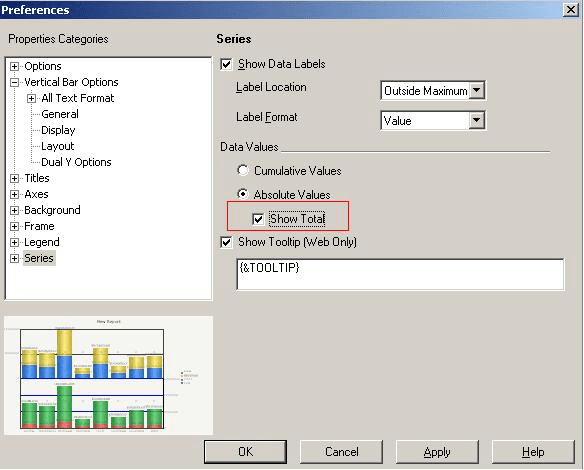
  • Right-click the graph and select "Graph Options" > "Series", enable "Show Data Labels", select "Absolute Values" under Data Values and enable the "Show Total" option, as shown below:

ka02R000000kVb8QAE_0EM440000002DKj.png
  • The zero labels appear along the horizontal line in the middle of the graph.

 
CAUSE:
This is a known issue in Strategy Developer 9.x and 10.x.  This issue only occursfor the graph type "Vertical Bar:Bipolar Stacked" and "Vertical Bar:DualAxis Stacked".
 
ACTION:
Contact Strategy Technical Support for an update on this issue.
 
WORKAROUND:
Change the graph type to something other than "Vertical Bar:Bipolar Stacked" or "Vertical Bar:DualAxis Stacked".


Comment

0 comments

Details

Knowledge Article

Published:

May 31, 2017

Last Updated:

May 31, 2017