SYMPTOM:
When importing a new SAP cube into Strategy users may faced the error shown below:
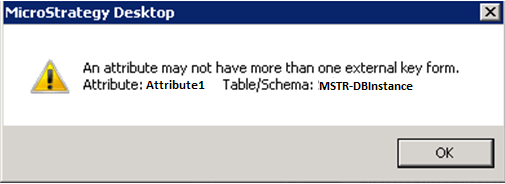
At the time of the import operation, the same error can be found in the DSSErrors log:
2011-11-01 11:55:40.070 An attribute may not have more than one external key form. Attribute: Attribute1, Table/Schema: MSTR-DBInstance.
Note:
This issue may be also faced when trying to add a dataset built on SAP data through Strategy Web.
CAUSE:
Error shown above is very useful when troubleshooting this specific issue. It provides a lot of information to narrow down the problem:
a) "An attribute may not have more than one external key form"
Each Strategy attribute created by importing a SAP cube can only have one and only one External Key Form. This flag is used by the Strategy Engine to send information back to the SAP source when a prompt is answered.
b) "Attribute: Attribute1"
This part of the error message will show the attribute facing the actual issue. Within the "Attribute1" attribute, 2 different attribute forms were flagged as "Variable Qualification form" in the GUI.
ACTION:
An easy solution is available to fix this problem. One of the attribute forms needs to be unflagged to keep just one External key form. Below are the steps needed to implement the workaround.
1) Open the MDX cube catalog
2) Click on the "Cube Mapping" tab and Select the cube that was previously imported and contains the "Attribute1" attribute
3) Locate the attribute.
4) Clear the External Key form flag
a) To remove the flag (shown as "Variable Qualification form" in the GUI) from the unwanted column, select the form (ID or Key, whatever should not be an external key form)
b) Open the drop-down menu
c) Select <Unmapped> (to clean the column and clear the external key form flag)
4) Set the column map to the attribute form again. IMPORTANT: Do not right click on the form. This will set the flag again.
5) Hit Save and close immediately after last step.
6) Try importing the new cube. It should work now.
a) Schema refresh operation could be needed so Strategy Engine can read changes made.
