EducationSoftwareStrategy.com
StrategyCommunity

Knowledge Base

Product

Community

Knowledge Base

TopicsBrowse ArticlesDeveloper Zone

Product

Download SoftwareProduct DocumentationSecurity Hub

Education

Tutorial VideosSolution GalleryEducation courses

Community

GuidelinesGrandmastersEvents
x_social-icon_white.svglinkedin_social-icon_white.svg
Strategy logoCommunity

© Strategy Inc. All Rights Reserved.

LegalTerms of UsePrivacy Policy
  1. Home
  2. Topics

KB39588: How to control the position of Sunday in the calendar selector (date picker) of date prompt in MicroStrategy Web?


Community Admin

• Strategy


In MicroStrategy Web 9.x, date prompt is displayed as a calendar selector (date picker). The position of Sunday is on the left by default. This document explains how to control the place of Sunday in the calendar of date prompt.

In Strategy Web 9.x, date prompt is displayed as a calendar selector (date picker). The position of Sunday is on the left by default. This document explains how to control the place of Sunday in the calendar of date prompt.
 
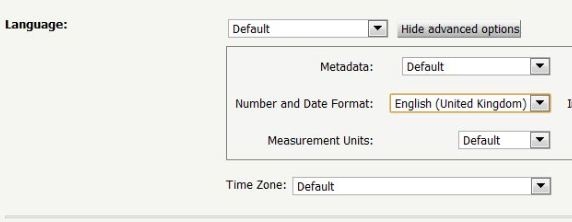
Go to User Preference, under General options, select English(United Kingdom) in "Number and Date Format", as shown below:
 

ka04W000000OeNJQA0_0EM4400000027En.jpeg

 
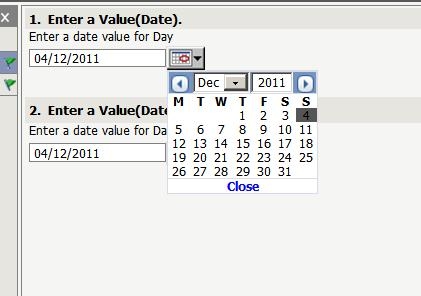
The position of Sunday is present on the right, as shown below:
 

ka04W000000OeNJQA0_0EM4400000027Ec.jpeg

 
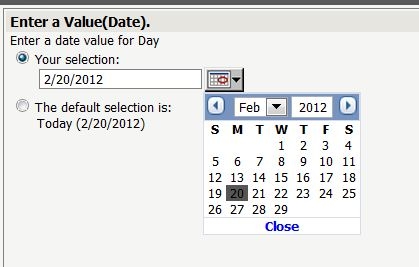
If selecting English(United States), the position of Sunday is present on the left, as shown below:
 

ka04W000000OeNJQA0_0EM4400000027Eo.jpeg


Comment

0 comments

Details

Knowledge Article

Published:

June 11, 2017

Last Updated:

June 11, 2017