EducationSoftwareStrategy.com
StrategyCommunity

Knowledge Base

Product

Community

Knowledge Base

TopicsBrowse ArticlesDeveloper Zone

Product

Download SoftwareProduct DocumentationSecurity Hub

Education

Tutorial VideosSolution GalleryEducation courses

Community

GuidelinesGrandmastersEvents
x_social-icon_white.svglinkedin_social-icon_white.svg
Strategy logoCommunity

© Strategy Inc. All Rights Reserved.

LegalTerms of UsePrivacy Policy
  1. Home
  2. Topics

KB3964: How to view the SQL generated by MicroStrategy SQL Generation Engine for a report job or element browsing


Community Admin

• Strategy


How to view the SQL generated for jobs in MicroStrategy

Report job:

  1. In Strategy Developer, browse to the report to be run.
  2. Right-click on the report and select “View SQL.”

 or

  1. Log in to Strategy Intelligence Server as an administrator.
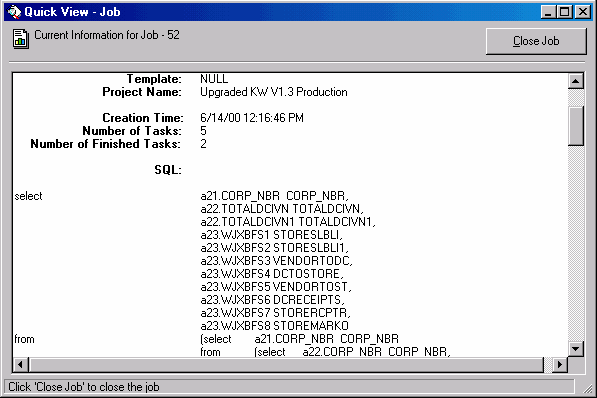
  2. Under the Intelligence Server Administrator icon, click on the Job Monitor and select a job.
  3. Choose “Quick View.”
     
    NOTE: When the job is finished, it is closed and report SQL will no longer be available in the Job Monitor.


ka0PW0000002yOHYAY_0EM440000002GKY.gif


Intelligence Server or Developer diagnostics
Open the Diagnostics Configuration editor through one of the following actions:
 

  • In Windows, go to the Start menu > Programs > Strategy > Tools > Diagnostics Configuration.
  • In UNIX, use “cd” to set the current working directory to /bin and execute the command ./mstrdiag.

NOTE: If the report will be run in a two-tier connection, configure the diagnostics on the Developer machine. In three-tier, the diagnostics should be set up on the Intelligence Server machine.
 

  1. Select "Machine Default" in the "Select Configuration" drop-down menu for a two-tier connection, or "CastorServer Instance" for three-tier .
  2. Under Database Classes component, select dispatcher "SQL trace"
  3. When capturing SQL on the Intelligence Server, the Intelligence Server must be restarted to enable the log.
  4. Run the report. SQL is logged in the trace file.

NOTE: Disable the trace after the SQL appears to optimize performance.
 
Data Flow Control (DFC) Engine tracing:

  1. Enable the DFC Engine trace under Engine component in the diagnostics Configuration editor, as described under "Intelligence Server or Developer diagnostics."
  2. Run the report. SQL is logged in the trace file.
     
    NOTE: Disable the trace after the SQL appears to optimize performance.

 
Enterprise Manager job data:
If the project is configured to log SQL statements into the Enterprise Manager repository, SQL statements may be retrieved using the Enterprise Manager project. The attribute "Report Job SQL Pass" contains the SQL statement text.
 
View SQL on the database side:
Depending on the warehouse platform, users can view the SQL from the database side.
 
Element Browsing Request:
Only Intelligence Server/Developer diagnostics, DFC Engine logging, and viewing SQL on the database side can be used to retrieve the SQL for Element Browsing Requests.


Comment

0 comments

Details

Knowledge Article

Published:

May 5, 2017

Last Updated:

August 12, 2024