EducationSoftwareStrategy.com
StrategyCommunity

Knowledge Base

Product

Community

Knowledge Base

TopicsBrowse ArticlesDeveloper Zone

Product

Download SoftwareProduct DocumentationSecurity Hub

Education

Tutorial VideosSolution GalleryEducation courses

Community

GuidelinesGrandmastersEvents
x_social-icon_white.svglinkedin_social-icon_white.svg
Strategy logoCommunity

© Strategy Inc. All Rights Reserved.

LegalTerms of UsePrivacy Policy
  1. Home
  2. Topics

KB39646: How to remove data marker from line graphs in MicroStrategy Web


Community Admin

• Strategy


How to remove data marker from line graphs in MicroStrategy Web

In Strategy Developer, a graph formatting feature is available to show or hide data markers on a line graph object:
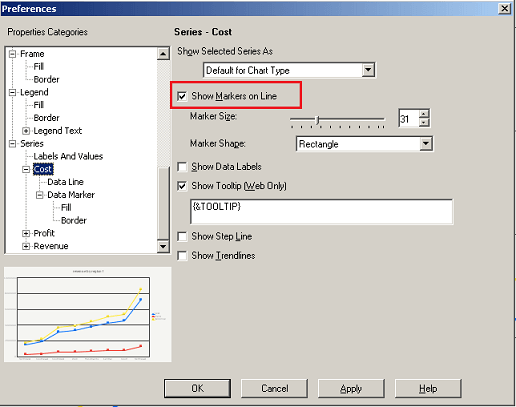
 

ka04W000000OeCXQA0_0EM4400000027Do.png

 
This check box, however, is not available under Strategy Web 9.x graph format feature. User that want to show/hide data markers through Strategy Web 9.x can follow the following steps to achieve the result:
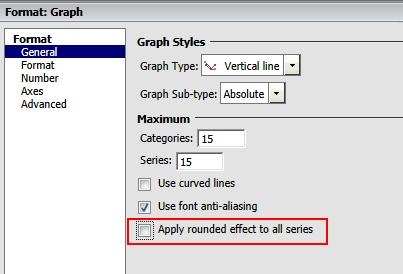
 

  • Edit the graph object in Strategy Web and enter Graph Format options.
  • De-select the checkbox "Apply rounded effect to all series":
ka04W000000OeCXQA0_0EM4400000027Dz.jpeg
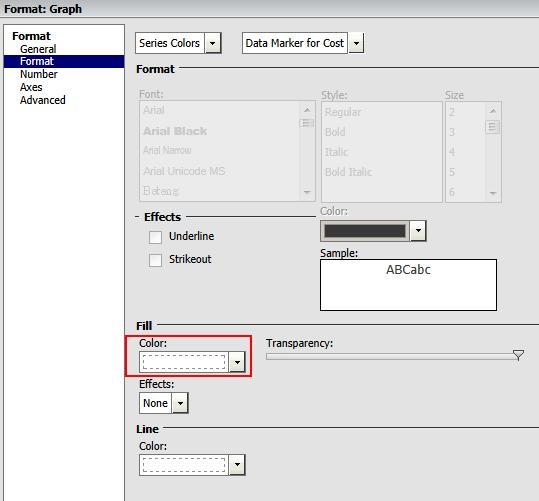
  • Navigate to Format tab. In the drop downs, select "Series Colors" and "Data Marker for "
  • Under Fill settings, change the drop-down option to "No Fill":
ka04W000000OeCXQA0_0EM4400000027Du.jpeg
  • Repeat steps 3 and 4 for other metrics that needs to be modified

The result of a sample report is shown below:
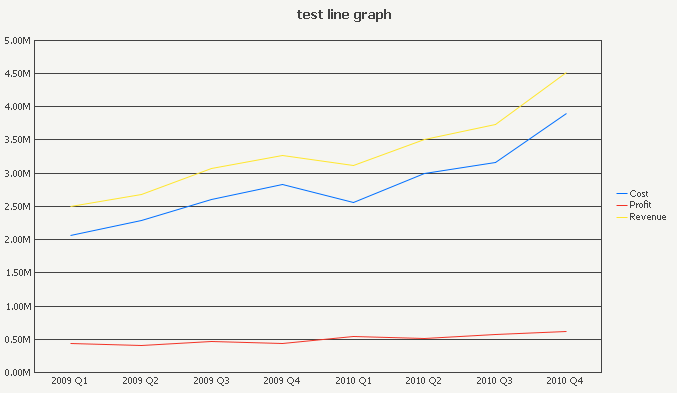
ka04W000000OeCXQA0_0EM4400000027Dx.png


Comment

0 comments

Details

Knowledge Article

Published:

June 13, 2017

Last Updated:

June 13, 2017