EducationSoftwareStrategy.com
StrategyCommunity

Knowledge Base

Product

Community

Knowledge Base

TopicsBrowse ArticlesDeveloper Zone

Product

Download SoftwareProduct DocumentationSecurity Hub

Education

Tutorial VideosSolution GalleryEducation courses

Community

GuidelinesGrandmastersEvents
x_social-icon_white.svglinkedin_social-icon_white.svg
Strategy logoCommunity

© Strategy Inc. All Rights Reserved.

LegalTerms of UsePrivacy Policy
  1. Home
  2. Topics

KB39651: Missing number formatting for negative numbers in Graph reports in MicroStrategy Developer 10.x


Stefan Zepeda

Salesforce Solutions Architect • Strategy


In MicroStrategy Developer 10.x, five kinds of number formatting are available for negative numbers of Fixed, Currency, and Percent type of numbers in Metric editor and Grid formatting. However, only four kinds are available for negative numbers of Fixed, Currency and Percent type of numbers in Graph.

SYMPTOM:
 
In Strategy Developer 10.x, five kinds of number formatting are available for negative numbers of Fixed, Currency, and Percent type of numbers in Metric editor and Grid formatting. However, only four kinds are available for negative numbers of Fixed, Currency and Percent type of numbers in Graph.
 
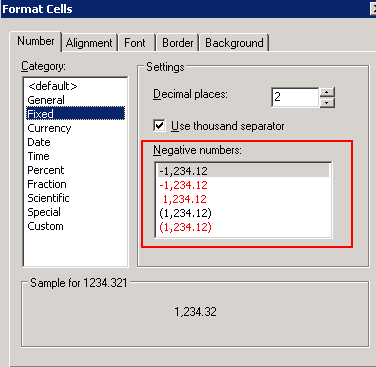
Take the Fixed type as an example as shown below:
 
In Grid report, there are five kinds of number formatting, as shown below:


ka02R000000kVp5QAE_0EM440000002DJ5.png


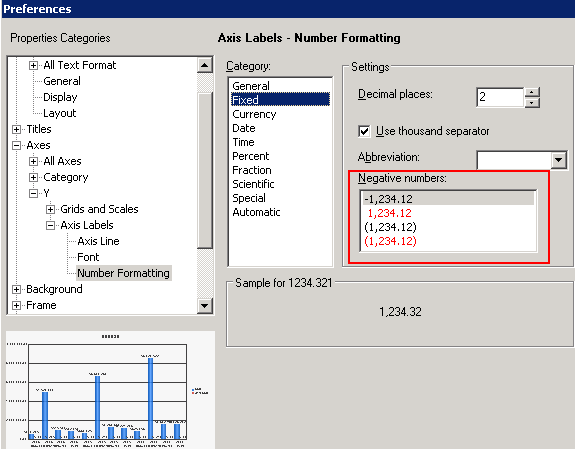
In Graph report, there are only four kinds of number formatting as shown below. The first screenshot is for the number formatting of Axes and the second screenshot is for the number formatting of data labels.
 

ka02R000000kVp5QAE_0EM440000002DJ7.png


ka02R000000kVp5QAE_0EM440000002DJ1.png


CAUSE:
 
This is a known issue in Strategy Developer 10.x.
 
ACTION:
 
Strategy will continue to investigate and post updates as soon as they are available.


Comment

0 comments

Details

Knowledge Article

Published:

May 23, 2017

Last Updated:

May 23, 2017