EducationSoftwareStrategy.com
StrategyCommunity

Knowledge Base

Product

Community

Knowledge Base

TopicsBrowse ArticlesDeveloper Zone

Product

Download SoftwareProduct DocumentationSecurity Hub

Education

Tutorial VideosSolution GalleryEducation courses

Community

GuidelinesGrandmastersEvents
x_social-icon_white.svglinkedin_social-icon_white.svg
Strategy logoCommunity

© Strategy Inc. All Rights Reserved.

LegalTerms of UsePrivacy Policy
  1. Home
  2. Topics

KB3967: How to temporarily disable all scheduled reports in MicroStrategy Intelligence Server?


Community Admin

• Strategy


How to temporarily disable all scheduled reports in MicroStrategy Intelligence Server?

Users might have one of the following business requirements:

  1. While users troubleshoot the system, they do not want any scheduled job launched.
  2. For a certain period of time, there is no warehouse update, so users want to disable all scheduled reports to reduce the load on the system.
  3. While in the middle of designing the system's scheduler strategy, users do not want to run the finished scheduled reports before the whole project is completed.
  4. Users want to disable the scheduled reports because they do not want to support it on the system.

 
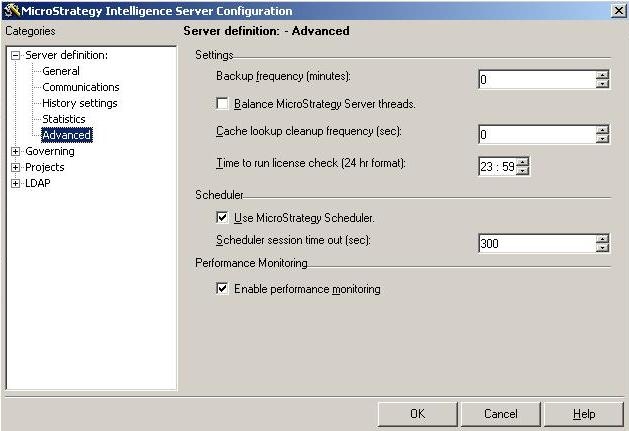
To work on either of these requirements, uncheck the 'Use Strategy Scheduler' setting in the Server Configuration Wizard.
ka04W00000148fXQAQ_0EM440000002ByZ.jpeg

 
After modifying this setting, Strategy Intelligence Server must be restarted for the effect to take place. When this setting is unchecked, users can create events, set triggers and schedule reports. The only difference is that Strategy Scheduler does not run the scheduled jobs.


Comment

0 comments

Details

Knowledge Article

Published:

June 5, 2017

Last Updated:

May 11, 2022