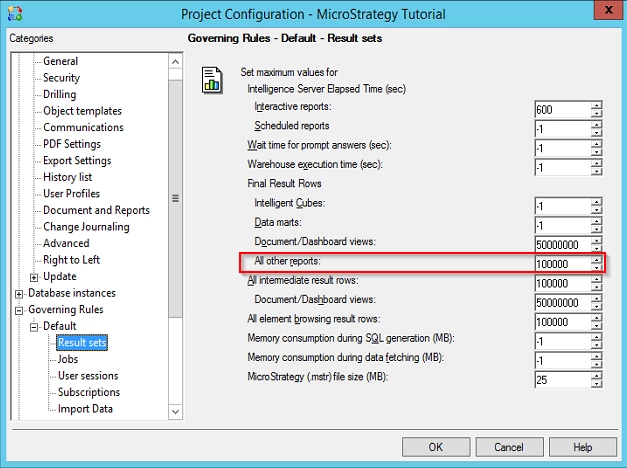
The "Set maximum value for Final Result Rows: All other reports" setting governs the actual number of result rows returned by the database before any processing by the Strategy Intelligence Server.
For reports that involve cross-tabulation, there can be significant differences in that number when compared to the number of rows actually displayed for the user.
The following example briefly examines such a situation while illustrating how the setting governs the report.
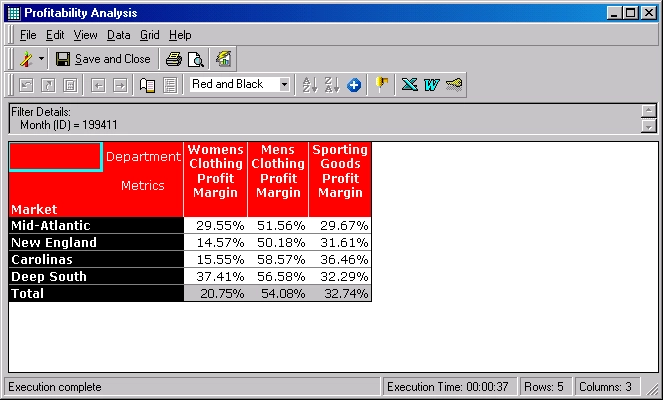
For example, when a user is able to execute a report that returns only five rows, as follows:
After this, the "Number of report result rows" setting is adjusted to '6' and the user attempts to re-execute the same report against the database. The following error message is returned:
Error: The QueryEngine encountered error: The report result cannot be displayed because it exceeds the maximum row limit in governing.
Error in Process method of Component: QueryEngineServer, Project 0, Job 49, Error Code= -2147212544.
Initially, it may appear that the governing setting should not have restricted this report. However, it should be noted that the governing setting is applied at the number of rows the database actually returns, instead of the data returned after cross tabulation by Strategy Engine.
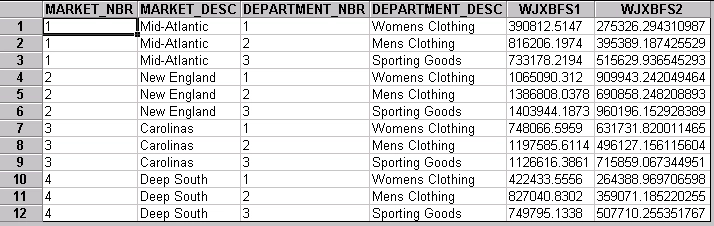
In this example, the database actually returned 12 rows (see the following screenshot, which is acquired by executing the SQL directly against the warehouse). As the raw data is 12 rows, it exceeded the row limit and the governing terminated the request. The data was not returned.