EducationSoftwareStrategy.com
StrategyCommunity

Knowledge Base

Product

Community

Knowledge Base

TopicsBrowse ArticlesDeveloper Zone

Product

Download SoftwareProduct DocumentationSecurity Hub

Education

Tutorial VideosSolution GalleryEducation courses

Community

GuidelinesGrandmastersEvents
x_social-icon_white.svglinkedin_social-icon_white.svg
Strategy logoCommunity

© Strategy Inc. All Rights Reserved.

LegalTerms of UsePrivacy Policy
  1. Home
  2. Topics

KB39702: Inconsistent file extensions are produced when exporting to Excel 2007 in MicroStrategy Web with Internet Explorer


Community Admin

• Strategy


SYMPTOM:
 
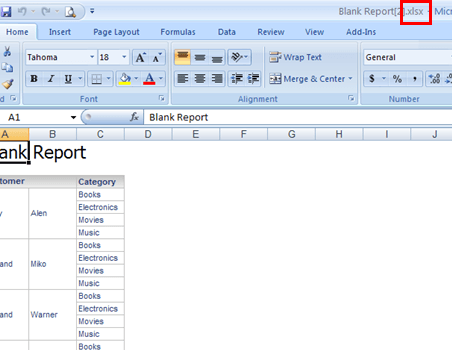
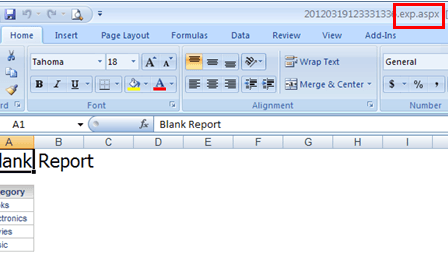
When exporting a report to Excel 2007, inconsistent file extensions appears in Excel when open the exported files directly. Sometimes an .xlsx extension and other times an .exp.aspx file extension.
This is only a display problem in Excel and actually do not influence the usage of the exported Excel file. After use save the file to local disk, it correctly render as .xlxs file extension.
 
STEPS TO REPRODUCE:
  • In Internet Explorer, create a report with customer and category on the rows.
  • Export the report to Excel with formatting.
    Note: Make sure the Export Preference is set to export to Excel 2007 and newer.
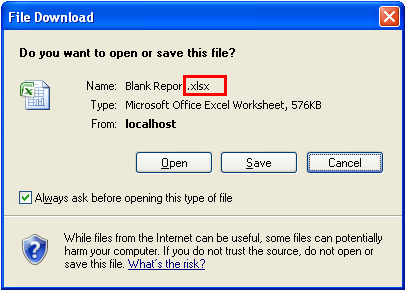
  • When the file download pop up appears, notice the name of the report has an xlsx extension.
ka04W00000148jPQAQ_0EM4400000027CN.png
  • Select "open" and notice the Excel file opens as an xlsx file.

ka04W00000148jPQAQ_0EM4400000027CP.png
  • Create a report with category only in the rows.
  • Export to Excel with formatting.
  • When the file download pop up appears, notice the name of the report still has an xlsx file extension.
     
ka04W00000148jPQAQ_0EM4400000027CW.png
  • The Excel file opens with an exp.aspx extension

 
CAUSE:
 
During export, Strategy Web sends an HTTP header that indicates the suggested file name use “Content-Disposition”.  But Internet Explorer does not use the filename attribute from "Content-Disposition" header when directly open. Instead, it uses the last part of the request URL path info. This is known issue with IE.
ACTION:
 The issue has been addressed in 10.7.  
WORKAROUND:

  1. Use Firefox or Chrome instead as the issue does not occur in them.
  2. In the Save as dialog, save the exported file locally instead of clicking Open directly.
  3. Even with esp.aspx appears as file name, when user Save the Excel file from Excel, it use the correct .xlsx file extension.

Comment

0 comments

Details

Knowledge Article

Published:

April 7, 2017

Last Updated:

November 7, 2019