EducationSoftwareStrategy.com
StrategyCommunity

Knowledge Base

Product

Community

Knowledge Base

TopicsBrowse ArticlesDeveloper Zone

Product

Download SoftwareProduct DocumentationSecurity Hub

Education

Tutorial VideosSolution GalleryEducation courses

Community

GuidelinesGrandmastersEvents
x_social-icon_white.svglinkedin_social-icon_white.svg
Strategy logoCommunity

© Strategy Inc. All Rights Reserved.

LegalTerms of UsePrivacy Policy
  1. Home
  2. Topics

KB39724: Where can a user find the xml file which is generated after establishing a trust relationship between the MicroStrategy Intelligence Server and MicroStrategy Web


Community Admin

• Strategy


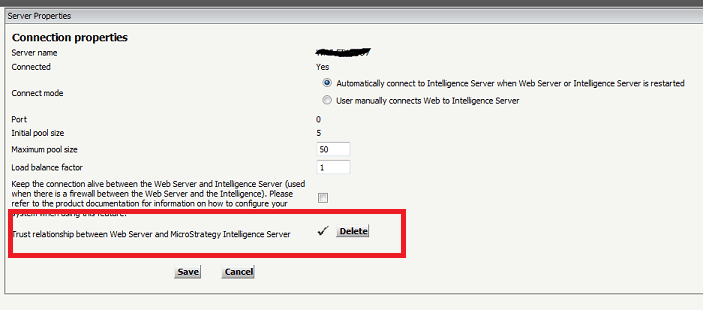
Where can a user find the xml file which is generated after establishing a trust relationship between the MicroStrategy Intelligence Server and MicroStrategy Web.

When a trust relationship is established between Strategy Intelligence Server and Web Server a xml file is generated.
 

ka04W000000uGB0QAM_0EM4400000027DA.png

 
The XML file is saved on the web server machine under Strategy--> Web ASPx --> Web INF --> xml folder.
The file is named as the Iserver name.token and can be found only in the Web server machine.
 

ka04W000000uGB0QAM_0EM4400000027DG.png

 
On Strategy JSP the token is located under \WEB-INF\xml.
 
For more information on how to set up Trustes Authentication in a Strategy environment, refer to Technical Note KB30292: How to setup Trusted Authentication (Single Sign On) for the MicroStrategy Intelligence Server 9


Comment

0 comments

Details

Knowledge Article

Published:

June 15, 2017

Last Updated:

June 15, 2017