SYMPTOM:
A prompted report on an iPad that is set to run by default as Export to PDF, has no way of being reprompted after executing the document once in Strategy Mobile 9.x.
STEPS TO REPRODUCE:
Consider the following scenario in which a prompted Document is set to Run by Default as Export to PDF.
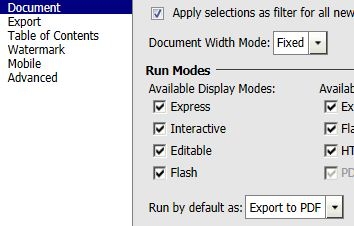
When viewing this Document on the Strategy 9.x iPad application, the document will run into the PDF viewer embedded in the app where there will be no Filter button at the top right corner to review the prompt answers or submit new answers. Even if the document is closed and rerun, the prompts page will not appear.
CAUSE:
This is a known issue in Strategy Mobile 9.x application.
ACTION:
This issue has been addressed in Strategy Mobile 10 application. Update the app to that version to take advantage of the fix.
WORKAROUND:
If possible, set the Strategy Mobile 9.x app to clear the caches on close. Then close and reopen the app to be presented with the prompts page again.
Note: this will also clear the caches for subscribed reports and will prevent them from running offline.
