EducationSoftwareStrategy.com
StrategyCommunity

Knowledge Base

Product

Community

Knowledge Base

TopicsBrowse ArticlesDeveloper Zone

Product

Download SoftwareProduct DocumentationSecurity Hub

Education

Tutorial VideosSolution GalleryEducation courses

Community

GuidelinesGrandmastersEvents
x_social-icon_white.svglinkedin_social-icon_white.svg
Strategy logoCommunity

© Strategy Inc. All Rights Reserved.

LegalTerms of UsePrivacy Policy
  1. Home
  2. Topics

KB39787: The URL path is not visible in the report properties dialog box in MicroStrategy Web


Community Admin

• Strategy


The URL path is not visible in the report properties dialog box in MicroStrategy Web

SYMPTOM
 
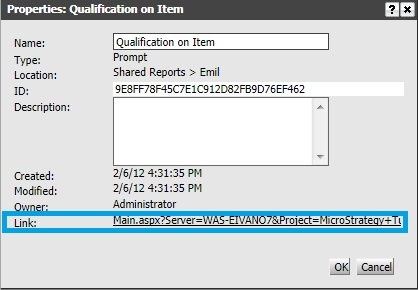
Each report and document has a URL path that could be used to directly execute the object when pasted in the browser address bar. The URL path can be found in the properties section when a user right-clicks on the object. 
 
The expected view of that window is as follows:
ka04W000000OgflQAC_0EM4400000027Bm.jpeg

 
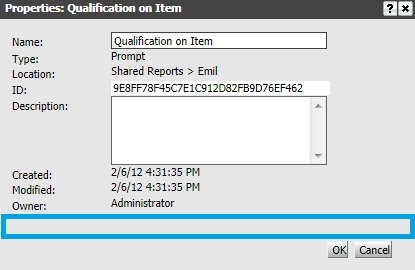
The view observed by some users without the link feature:
 

ka04W000000OgflQAC_0EM4400000027Bo.jpeg

 
CAUSE
 
The required feature is not enabled in the Strategy Web Admin page.
 
ACTION

  • Navigate to the Strategy Web Admin page.
  • Select 'Security' on the left-hand side.
  • Under 'URL', enable the feature - "Session information is included on the URL".
     
ka04W000000OgflQAC_0EM4400000027Bg.jpeg

 
WORKAROUND
 
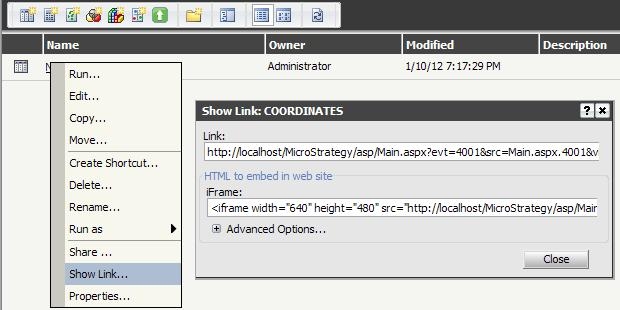
If the session information setting should remain off for security reasons, use the Show Link feature as shown below.
 

ka04W000000OgflQAC_0EM4400000027Bq.jpeg


Comment

0 comments

Details

Knowledge Article

Published:

June 13, 2017

Last Updated:

June 13, 2017