EducationSoftwareStrategy.com
StrategyCommunity

Knowledge Base

Product

Community

Knowledge Base

TopicsBrowse ArticlesDeveloper Zone

Product

Download SoftwareProduct DocumentationSecurity Hub

Education

Tutorial VideosSolution GalleryEducation courses

Community

GuidelinesGrandmastersEvents
x_social-icon_white.svglinkedin_social-icon_white.svg
Strategy logoCommunity

© Strategy Inc. All Rights Reserved.

LegalTerms of UsePrivacy Policy
  1. Home
  2. Topics

KB39826: New Feature in 9.3.0 MicroStrategy Web: Export to PDF - Selector Display Behavior


Community Admin

• Strategy


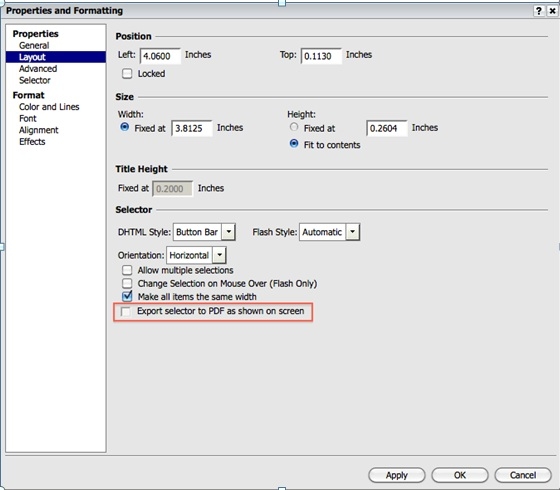
In 9.3.0, users are now able to specify the behavior of selectors when exported to PDF files

In 9.3.0, users are now able to specify the behavior of selectors when exported to PDF files.  This property allows users to toggle between displaying the current selections and displaying text only (the pre-9.3.0default).
This property is exposed in the Properties and Formatting menu of each eligible selector.
ka04W000001MKqdQAG_0EM4400000027C6.jpeg

 
 This feature applies to the following types of eligible selectors:

  • Button Bar,
  • Radio Buttons,
  • Link Bar,
  • Check Boxes.

For example, before having this new option checked, the text selections are displayed:

ka04W000001MKqdQAG_0EM4400000027C8.jpeg

 
After checking the new option the selectors are displayed as shown on the Dashboard:

ka04W000001MKqdQAG_0EM4400000027C0.jpeg


Comment

0 comments

Details

Knowledge Article

Published:

April 6, 2017

Last Updated:

April 6, 2017