EducationSoftwareStrategy.com
StrategyCommunity

Knowledge Base

Product

Community

Knowledge Base

TopicsBrowse ArticlesDeveloper Zone

Product

Download SoftwareProduct DocumentationSecurity Hub

Education

Tutorial VideosSolution GalleryEducation courses

Community

GuidelinesGrandmastersEvents
x_social-icon_white.svglinkedin_social-icon_white.svg
Strategy logoCommunity

© Strategy Inc. All Rights Reserved.

LegalTerms of UsePrivacy Policy
  1. Home
  2. Topics

KB39832: Thresholds are not working when there are several page-by attributes and custom subtotals on a grid report in MicroStrategy Developer 9.x


Stefan Zepeda

Salesforce Solutions Architect • Strategy


Thresholds are not working when there are several page-by attributes and custom subtotals on a grid report in MicroStrategy Developer 9.x

SYMPTOM:
 
A user has a grid report that has several attributes both in the rows and in the page-by section. A metric on the report has a "Replace with Text" threshold applied. When a custom subtotal is added and applied "Across Levels", the threshold on the metric no longer works correctly.
 
STEPS TO REPRODUCE:
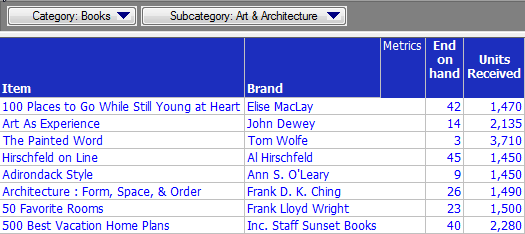
  • Edit the default Report Template called Inventory Analysis within the Tutorial project.
  • Place the attributes "Item" and "Brand" on the rows and both the available metrics on the columns.
  • Place Category and Subcategory on the page-by of the same report.
ka02R000000kcWuQAI_0EM440000002DHo.png
  • Create a custom subtotal.
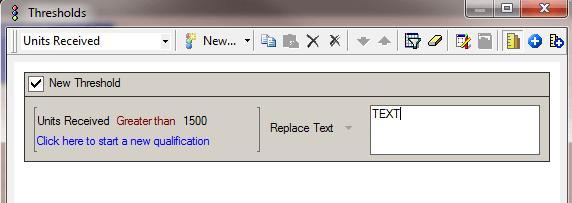
  • Create a threshold on the report metric “Units Received” to replace specific values with text as shown in the image below:
ka02R000000kcWuQAI_0EM440000002DHa.png
  • Run the report. The threshold is not applied to the subtotal values.


CAUSE:
 
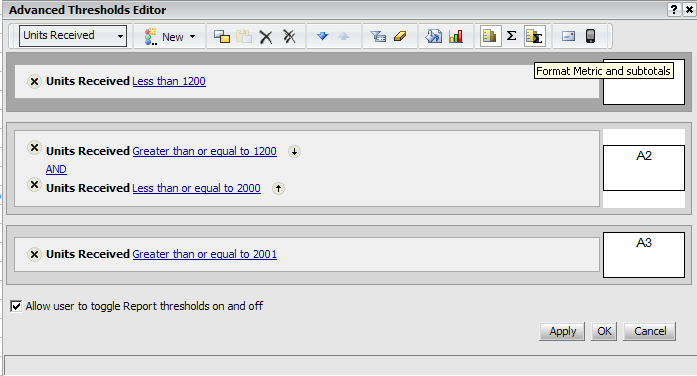
This is by design. The threshold does not apply to the values from a custom subtotal. This behavior can be changed through the Advanced Threshold editor, but that editor is not available in Strategy Developer.
 
 
WORKAROUND:
 
The user should run the report in Strategy Web, which has an Advanced Threshold editor:
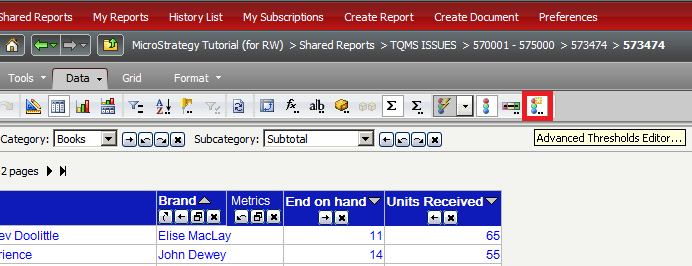
ka02R000000kcWuQAI_0EM440000002DHq.png

 
From here, the user can apply the threshold to the subtotal values as shown in the image below:
ka02R000000kcWuQAI_0EM440000002DHb.png

 
 Save and Close the report and re-open it in Strategy Developer. The report should now appear correctly.


Comment

0 comments

Details

Knowledge Article

Published:

April 14, 2017

Last Updated:

April 14, 2017