EducationSoftwareStrategy.com
StrategyCommunity

Knowledge Base

Product

Community

Knowledge Base

TopicsBrowse ArticlesDeveloper Zone

Product

Download SoftwareProduct DocumentationSecurity Hub

Education

Tutorial VideosSolution GalleryEducation courses

Community

GuidelinesGrandmastersEvents
x_social-icon_white.svglinkedin_social-icon_white.svg
Strategy logoCommunity

© Strategy Inc. All Rights Reserved.

LegalTerms of UsePrivacy Policy
  1. Home
  2. Topics

KB39833: Grid overflow will not 'Fit to grid contents' for an Excel export when one grid is below another and the grids overlap in Web 9.x and 10.x.


Community Admin

• Strategy


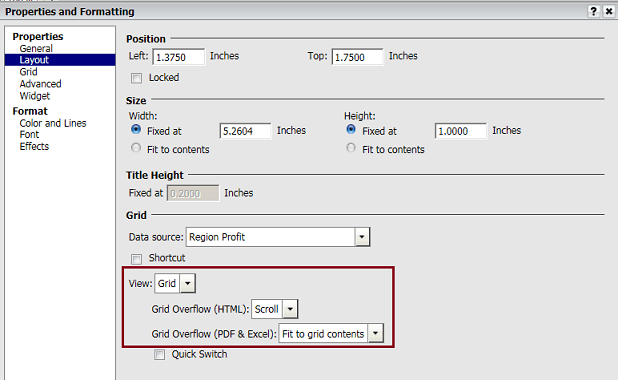
When exporting to Excel with the grid Properties > Layout > Grid Overflow (PDF & Excel) is set to Fit to grid contents, the lower grid will overlap the first and cut the grid overflow so not all of the contents of the upper grid are shown

SYMPTOM:
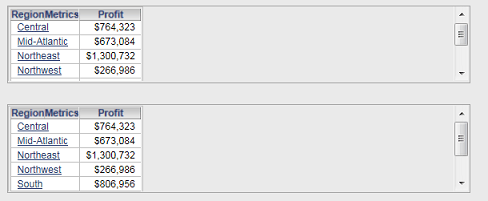
When one grid is directly above another, and the grid Properties > Layout > Grid Overflow (HTML) is set to scrollbar, the two grids will display a scrollbar to compensate for grid overflow in Strategy Web:
 

ka04W000000OeeGQAS_0EM4400000029mf.png


ka04W000000OeeGQAS_0EM4400000029mh.png

 
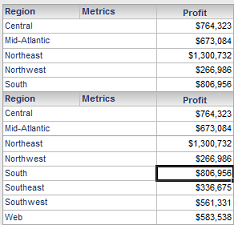
However, when exporting to Excel with the grid Properties > Layout > Grid Overflow (PDF & Excel) is set to Fit to grid contents, the lower grid will overlap the first and cut the grid overflow so not all of the contents of the upper grid are shown:
 

ka04W000000OeeGQAS_0EM4400000029me.png

 
CAUSE:
This is a limitation of Excel exporting. Excel does not support scroll bars on grids and the positions of the grids are fixed. Since all data is shown, the overlapping occurs.
 
WORKAROUND:
Place the two grids in different subsections of the document and ensure that the setting is enable for "height can grow" in both subsection.


Comment

0 comments

Details

Knowledge Article

Published:

June 7, 2017

Last Updated:

June 7, 2017