EducationSoftwareStrategy.com
StrategyCommunity

Knowledge Base

Product

Community

Knowledge Base

TopicsBrowse ArticlesDeveloper Zone

Product

Download SoftwareProduct DocumentationSecurity Hub

Education

Tutorial VideosSolution GalleryEducation courses

Community

GuidelinesGrandmastersEvents
x_social-icon_white.svglinkedin_social-icon_white.svg
Strategy logoCommunity

© Strategy Inc. All Rights Reserved.

LegalTerms of UsePrivacy Policy
  1. Home
  2. Topics

KB39835: How to view the contents of an Object Manager package without importing it?


Community Admin

• Strategy


This tech note explains how to view the contents of an Object Manager package without importing it

How to view the contents of an Object Manager package without importing it?
1. Open Object Manager and connect to a project
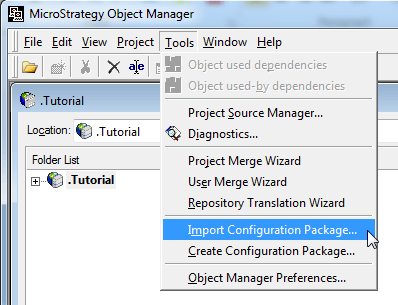
2. Open the Package Editor by selecting ‘Tools > Import Configuration Package...’
ka04W000000Obt9QAC_0EM440000002DHJ.png

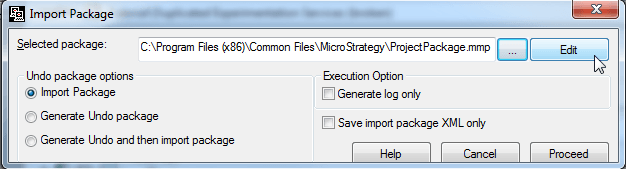
3. Choose the project package and select ‘Edit’
ka04W000000Obt9QAC_0EM440000002DHH.png

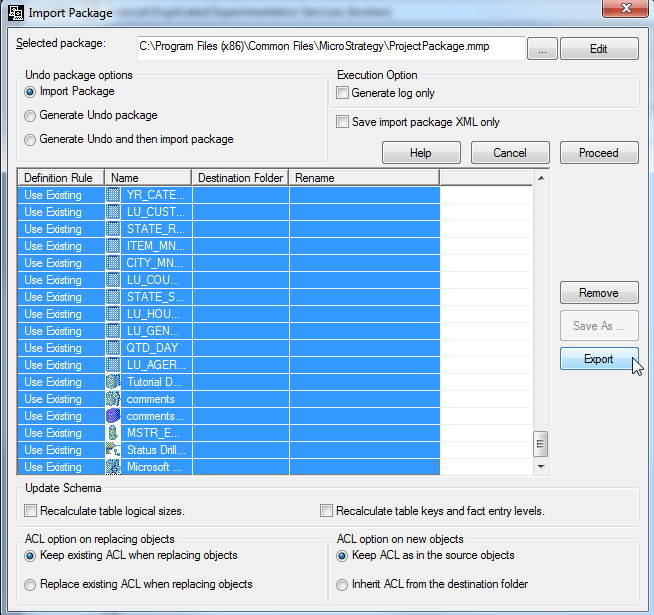
4. Select ‘Export’

ka04W000000Obt9QAC_0EM440000002DHM.png

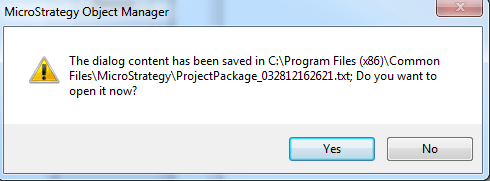
5. The contents of the package will be exported to a text file and can be viewed outside of Object Manager
ka04W000000Obt9QAC_0EM440000002DHK.png

 
KB39835


Comment

0 comments

Details

Knowledge Article

Published:

April 3, 2017

Last Updated:

November 13, 2018