EducationSoftwareStrategy.com
StrategyCommunity

Knowledge Base

Product

Community

Knowledge Base

TopicsBrowse ArticlesDeveloper Zone

Product

Download SoftwareProduct DocumentationSecurity Hub

Education

Tutorial VideosSolution GalleryEducation courses

Community

GuidelinesGrandmastersEvents
x_social-icon_white.svglinkedin_social-icon_white.svg
Strategy logoCommunity

© Strategy Inc. All Rights Reserved.

LegalTerms of UsePrivacy Policy
  1. Home
  2. Topics

KB39868: How to configure MicroStrategy Health Center in a UNIX/Linux system.


Community Admin

• Strategy


This document explains how to configure Master Health Agent (MHA) or Health Agent (HA) in a UNIX/Linux machine WITH graphical user interface (GUI

For configuring MHA or HA in a UNIX/Linux system WITHOUT GUI, refer to the technical note below:
KB35640 - How to configure Strategy Master Health Agent or Health Agent on a UNIX/Linux machine without any graphical user interface (GUI)
 
For configuring MHA or HA in a Windows system, refer to the technical note below:
KB32554 - How to Configure a Strategy Health Center system.
 
Configuring a New Health Center System
To configure a new Health Center system carry out the following tasks.

  • Configuring a machine as a Master Health Agent
  • Configuring a machine as a Health Agent

Configuring a machine as a Master Health Agent
Health Center requires that one machine in the Health Center system be designated as a Master Health Agent. This machine is responsible for most of the Health Center operations, such as scheduling system checks and transmitting diagnostics packages to Strategy Technical Support.
 
It is recommended to follow the best practices below for choosing a Master Health Agent machine:

  • The machine should be always available on the network, so that users can run diagnostic tests at any time.
  • The machine should have HTTPS access, so that it can download Health Center updates.
  • The machine should have FTP access so that it can send diagnostics packages to Strategy Technical Support.
  • The machine should not have a heavy additional workload. For example, a production environment Intelligence Server machine may not make a good Master Health Agent.

Follow the instructions below to configure a machine as a Master Health Agent:
 
Note: In a UNIX or Linux system, the Master Health Agent and daemon must be configured by a user with root access.
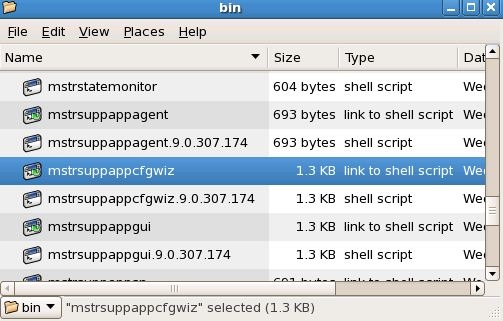
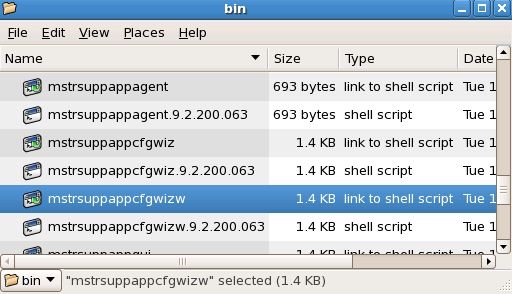
  • On that machine, open the Health Center Configuration Wizard:  
    • In UNIX/Linux, in the Health Center installation directory, in the //bin folder, run the program mstrsuppappcfgwiz.
       
ka04W000001482MQAQ_0EM440000002STk.jpeg
    •  
      Starting in Strategy 9.0.2, the program to launch the wizard becomes mstrsuppappcfgwizw.
       
ka04W000001482MQAQ_0EM440000002STS.jpeg
  • On the Welcome page, select Master Health Agent. Click Next.
     
  • In this step, users can set up the connection parameters and service credentials. The Display Name is the machine name populated automatically. The Port Number, by default is 44440, is the port number used by the Master Health Agent. The valid range is between 1024 and 65533. In UNIX/Linux, leave the Configure daemon check box selected to configure and install the Master Health Agent as a daemon. If users are running the Health Center Configuration Wizard from an account without root privileges, or if users want to run the Master Health Agent as an application, clear this check box. It is recommended to leave this check box selected.
     
ka04W000001482MQAQ_0EM440000002STY.jpeg
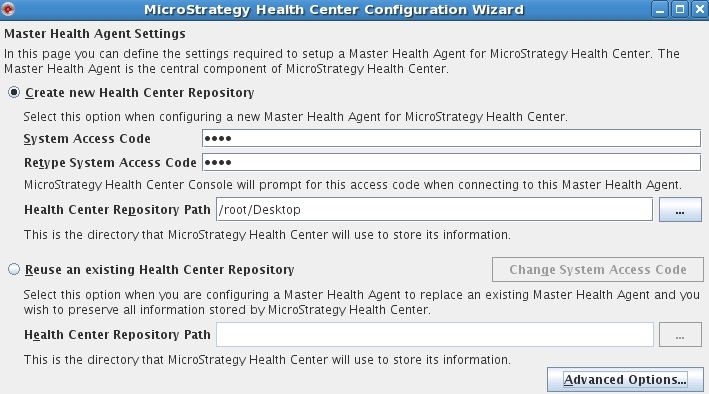
  • On this page, users configure the Health Center repository for the Master Health Agent. The repository contains configuration information about the Health Center system, such as the list of machines on the network and the Strategy products they have installed.
    • Create new Health Center repository to create a new repository for this Master Health Agent.
       
      In the System Access Code field, type an access code if desired. The Health Center Console must supply this code when connecting to this Master Health Agent.
       
      In the Repository Path field, type the location of the new information repository, or click Browse (...) to browse to the location.
    • Reuse an existing information repository to configure this Master Health Agent to use an existing repository.
       
      In the Repository Path field, type the location of the information repository, or click Browse (...) to browse to the location.
       
      Click Change System Access Code to change the access code for the repository. A dialog box opens. Type the old access code in the Old System Access Code field, and type the new access code in the New System Access Code and Retype System Access Code fields, then click Change.
       
ka04W000001482MQAQ_0EM440000002STj.jpeg
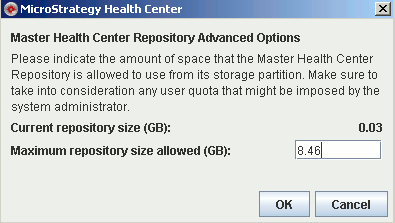
    • Click Advanced Options to open the Health Center Repository Advanced Options dialog box. In this dialog box, specify the maximum size (in gigabytes) of the Health Center Repository.
       
ka04W000001482MQAQ_0EM440000002STq.gif
    •  
      Click Next to move to the next page.
       
  • In this step, users configure the Health Center Update process. Health Center checks for updates every week, beginning 24 hours after users finish configuring the Master Health Agent. Please read the description and legal information about the Strategy Environment Information Upload process. To activate the Environment Information Upload process, select the check box. All information sent to Strategy as a result of this process is stored in the Census sub folder of the Health Center Repository. For more information about Customer Experience Improvement Program, refer to the technical note below:
     
    KB36742 - What is Strategy Health Center’s Customer Experience Improvement Program
      
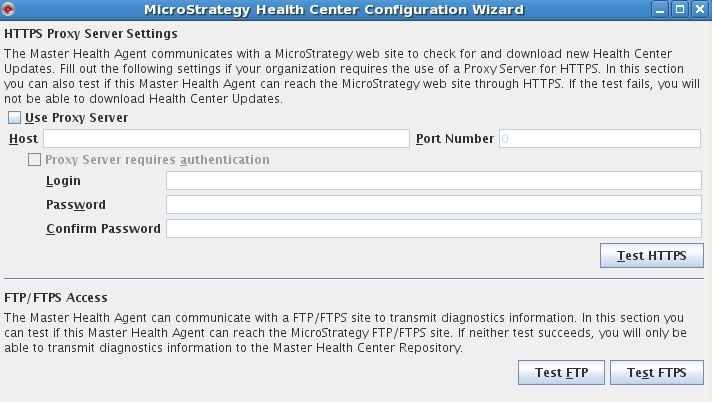
  • On this page, specify whether to use a proxy HTTPS server to download Health Center Updates. Users can also test the HTTPS connection, and the FTP and FTPS connections to the Strategy Technical Support destinations.
     
    Note: For more information on downloading Health Center Updates, please refer to the tech note:
     
    KB32553 How to keep the Health Center System Up To Date 
     
ka04W000001482MQAQ_0EM440000002STf.jpeg
  •  
    All parts of the Health Center Update process are performed across a secure HTTP (HTTPS) connection. If the network requires the use of a proxy server to connect via HTTPS, select the Use Proxy Server check box and provide the required information:
    • Host: the name or IP address of the proxy server.
    • Port: the port used to connect to the proxy server.
    • Proxy server requires authentication: select whether to provide a login and password to access the proxy server.
    • Login: the login name for the proxy server.
    • Password and Confirm Password: the password for the proxy ser
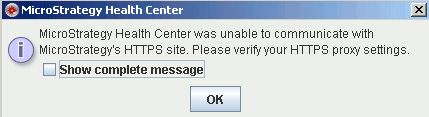
    • To test the HTTPS connection to the Strategy Health Center Update site, click Test HTTPS.
    • To test the FTP and FTPS connections to the Strategy Technical Support destinations, click Test FTP or Test FTPS.
       
      Test HTTPS successful message:
       
ka04W000001482MQAQ_0EM440000002STi.gif
    •  
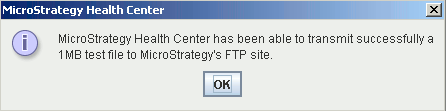
      Test FTP successful message:

       
ka04W000001482MQAQ_0EM440000002STo.gif
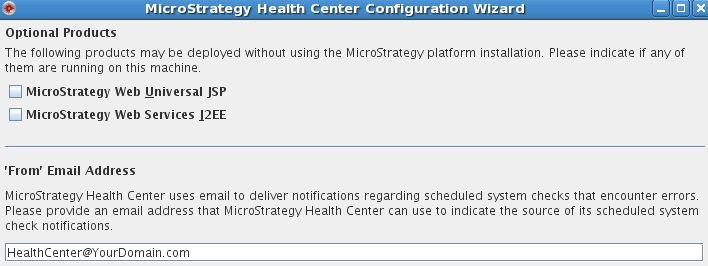
  • In the optional products page, specify whether any optional Strategy products are installed on this machine, and, for a Master Health Agent, what email address to use as the return address for Health Center notification emails.
     
    Some Strategy products do not require a full Strategy installation. Select the check boxes next to each of these products that is being used on this machine for Health Center to monitor these products.
     
    In the 'From' Email Address field, type the email address that users want to appear as the return address for Health Center notification emails. All emails notifying an administrator of a system check failure are displayed as coming from this address.
     
ka04W000001482MQAQ_0EM440000002STR.jpeg
  • The summary page shows the settings users selected. Click Finish to complete the Master Health Agent setup.

 
Configuring a machine as a Health Agent
Most of the machines in a Health Center system are configured as Health Agents. Health agents perform system checks when instructed to do so by a Master Health Agent, and pass the results of those checks to the Master Health Agent.
 
Because the Health Agent process requires relatively few system resources, users can configure all machines in the network as Health Agents with minimal impact on performance.
 
Follow the instruction below to configure a machine as a Health Agent:
Note: In a UNIX or Linux system, the Health Agent daemon must be configured by a user with root access.
  • On that machine, open the Health Center Configuration Wizard:.
    • In UNIX/Linux, in the Health Center installation directory, in the //bin folder, run the program mstrsuppappcfgwiz.
       Starting in Strategy 9.0.2, the program to launch the wizard becomes mstrsuppappcfgwizw.
       
  • On the Welcome page, select Health Agent.
     
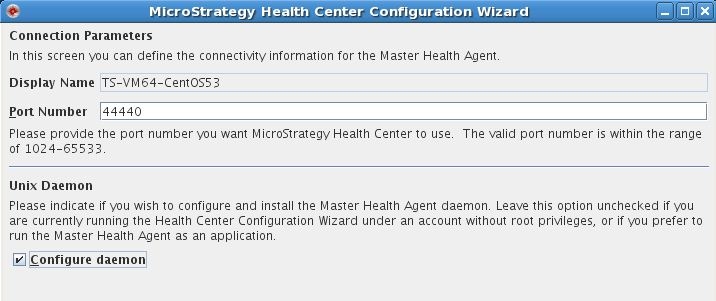
  • In this step, users can set up the connection parameters and service credentials. The Display Name is the machine name populated automatically. The Port Number, by default is 44440, is the port number used by the Master Health Agent. The valid range is between 1024 and 65533. The Service Credentials is the Windows NT account to be used to run the Health Agent service. It must have the service privilege enabled. Local System Account will be used by default.  
     
    In UNIX/Linux, leave the Configure daemon check box selected to configure and install the Health Agent a daemon. If users are running the Health Center Configuration Wizard from an account without root privileges, or if users want to run the Health Agent or Master Health Agent as an application, clear this check box. It is recommended to leave this check box selected.
     
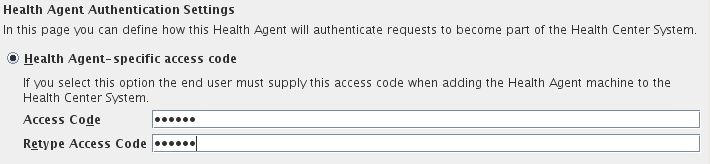
  • In this step, users specify an optional access code for the Health Agent, or a list of IP addresses that are allowed to connect to the Health Agent.
     
    • Select Health Agent-specific access code to require any Master Health Agent or Health Agent that tries to access this machine to provide a specific access code. Type the access code in the Access code and Retype access code fields.
       
ka04W000001482MQAQ_0EM440000002STX.jpeg
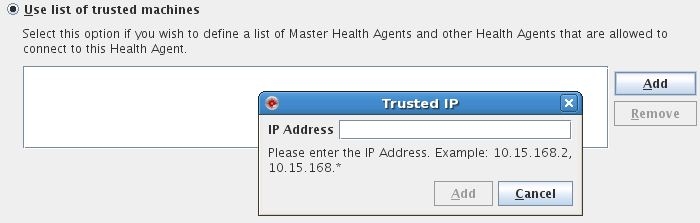
    • Select Use list of trusted machines to accept all connections from the IP addresses in the list, and reject all connections from other IP addresses. To add an IP address to the list, click Add and type the IP address in the field. To remove an IP address, select the address in the list and click Remove. 
       
ka04W000001482MQAQ_0EM440000002STT.jpeg
  •  
    Note: If users do not want to use either authentication method, select Health Agent-specific access code and leave the Access code and Retype access code fields blank.
     
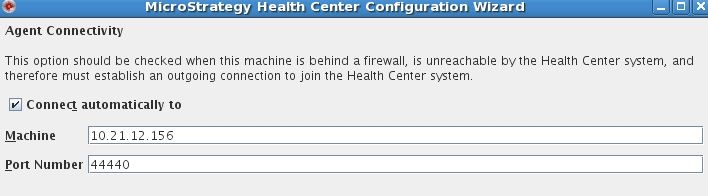
  • In this page, specify whether users want this agent to connect automatically to a specific Master Health Agent. If this Health Agent is behind a firewall that allows outbound traffic, select the Connect automatically to check box to have this machine connect automatically to a specified Master Health Agent. In this way the connection is not blocked by the firewall. 
     
    NOTE: if users are not certain whether there is a firewall or not, please DO NOT use this option until further confirmation with Network Administrator.
     
    • In the Machine field, type the IP address of the Master Health Agent to connect to.
    • In the Port field, type the number of the port that the specified Master Health Agent is using. 

ka04W000001482MQAQ_0EM440000002STg.jpeg
  • In this step, specify whether any optional Strategy products are installed on this machine. Some Strategy products do not require a full Strategy installation. Select the check boxes next to each of these products that is being used on this machine for Health Center to monitor these products.
     
  • The summary page shows users a summary of the choices made in setting up the machine as a Health Agent.

Back To Top 


Comment

0 comments

Details

Knowledge Article

Published:

June 27, 2017

Last Updated:

July 24, 2017