EducationSoftwareStrategy.com
StrategyCommunity

Knowledge Base

Product

Community

Knowledge Base

TopicsBrowse ArticlesDeveloper Zone

Product

Download SoftwareProduct DocumentationSecurity Hub

Education

Tutorial VideosSolution GalleryEducation courses

Community

GuidelinesGrandmastersEvents
x_social-icon_white.svglinkedin_social-icon_white.svg
Strategy logoCommunity

© Strategy Inc. All Rights Reserved.

LegalTerms of UsePrivacy Policy
  1. Home
  2. Topics

KB39873: "There is error in report definition. The element shown in the following hierarchy has invalid definition or no longer exists." when using a prompt within a filter on an date attribute that uses the Year function in its definiton in MicroStrategy


Stefan Zepeda

Salesforce Solutions Architect • Strategy


"There is error in report definition. The element shown in the following hierarchy has invalid definition or no longer exists." when using a prompt within a filter on an date attribute that uses the Year function in its definition in MicroStrategy

Sample Code/Error
 
SYMPTOM:
 
When the user runs a report that uses a prompt within a filter, based off a date attribute that uses the Year function the following error is thrown:

ka02R000000kcHzQAI_0EM440000002DI9.png

Sample Code/Error
 
Sample Code/Error
 
"Error: Unable to Start Execution"


STEPS TO REPRODUCE:
Within Strategy Tutorial:

  • Create a new date attribute. Change the form format to number and ensure the column alias is set to timestamp.
ka02R000000kcHzQAI_0EM440000002DI6.png
  • Save and close the attribute. Hit Yes for both messages and update schema.
  • Create a new report and place the newly created attribute on it.
  • Drag the newly created attribute into the "Report Filter" and create a new filter.
ka02R000000kcHzQAI_0EM440000002DIC.png
  • Hit the Prompt button on the right and hit Finish so it keeps all defaults. Hit OK.
  • Run the report.
  • When the prompt populates, move "2008" to the right and hit Finish.
  • An error will appear:
ka02R000000kcHzQAI_0EM440000002DIE.png
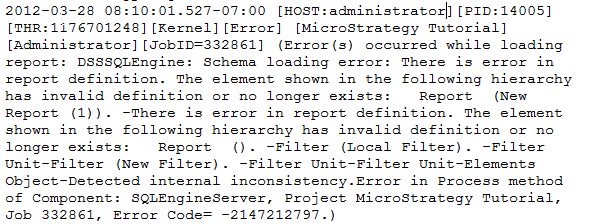
  • When the DSSErrors.log is checked, it throws this error:
ka02R000000kcHzQAI_0EM440000002DI8.png
  •  

    Sample Code/Error


    Sample Code/Error
    "(Error(s) occurred while loading report: DSSSQLEngine: Schema loading error: There is error in report definition. The element shown in the following hierarchy has invalid definition or no longer exists: Report (New Report (1))."


CAUSE:
 
This is a known issue in Strategy Developer 9.x.
 
ACTION:
 
Contact Strategy Technical Support for an update on this issue.
Strategy Only End
Strategy Only End


Comment

0 comments

Details

Knowledge Article

Published:

May 15, 2017

Last Updated:

May 15, 2017