EducationSoftwareStrategy.com
StrategyCommunity

Knowledge Base

Product

Community

Knowledge Base

TopicsBrowse ArticlesDeveloper Zone

Product

Download SoftwareProduct DocumentationSecurity Hub

Education

Tutorial VideosSolution GalleryEducation courses

Community

GuidelinesGrandmastersEvents
x_social-icon_white.svglinkedin_social-icon_white.svg
Strategy logoCommunity

© Strategy Inc. All Rights Reserved.

LegalTerms of UsePrivacy Policy
  1. Home
  2. Topics

KB39892: "An object with name 'XXX' and type 'User' or 'User Group' already exists in the destination folder" when creating a user group with MicroStrategy Developer 9.4.x-10.x


Stefan Zepeda

Salesforce Solutions Architect • Strategy


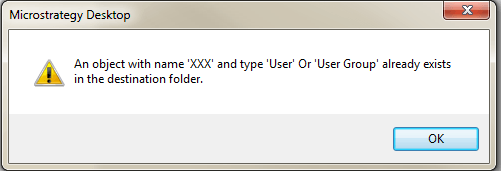
"An object with name 'XXX' and type 'User' or 'User Group' already exists in the destination folder" is thrown when creating a user group with MicroStrategy Developer 9.4.x-10.x.  The same name is not being used for another user group within the same folder.
SYMPTOM:
"An object with name 'XXX' and type 'User' or 'User Group' already exists in the destination folder" is thrown when creating a user group with Strategy Developer 9.4.x-10.x.  The same name is not being used for another user group within the same folder.

ka02R000000kcPDQAY_0EM440000002DHm.png

Sample Code/Error
Sample Code/Error
An object with name 'XXX' and type 'User' Or 'User Group' already exists in the destination folder.
 
 
CAUSE:
There is a user group with the same name somewhere within the project source. There can only be one user group with that name within each project source, not just the sub group.
 
ACTION:
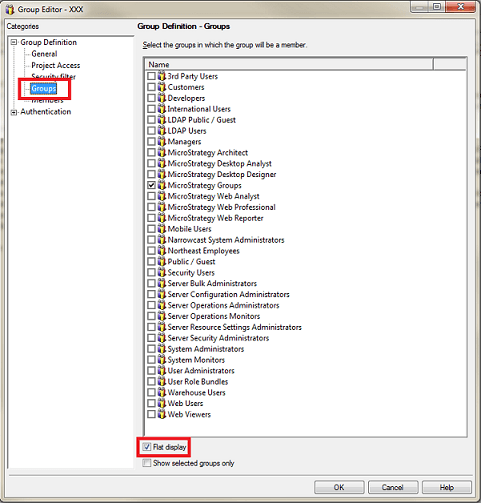
Edit a user group and select "Groups." Check "Flat Display" at the bottom. This will show the full list of user groups for the entire project so users can see the already existing user group.
ka02R000000kcPDQAY_0EM440000002DHk.png

 
Alternatively, run a search for configuration objects to list all the existing user groups and identify the duplicate one.


Comment

0 comments

Details

Knowledge Article

Published:

April 27, 2017

Last Updated:

April 27, 2017