EducationSoftwareStrategy.com
StrategyCommunity

Knowledge Base

Product

Community

Knowledge Base

TopicsBrowse ArticlesDeveloper Zone

Product

Download SoftwareProduct DocumentationSecurity Hub

Education

Tutorial VideosSolution GalleryEducation courses

Community

GuidelinesGrandmastersEvents
x_social-icon_white.svglinkedin_social-icon_white.svg
Strategy logoCommunity

© Strategy Inc. All Rights Reserved.

LegalTerms of UsePrivacy Policy
  1. Home
  2. Topics

KB39900: The option "Fit to contents" is disappeared in Properties and Formatting dialog when the option "Show Title Bar" is enabled for a grid in a Report Services document in MicroStrategy 9.x and 10.x


Stefan Zepeda

Salesforce Solutions Architect • Strategy


The option "Fit to contents" is disappeared in Properties and Formatting dialog when the option "Show Title Bar" is enabled for a grid in a Report Services document in MicroStrategy 9.x and 10.x

SYMPTOM:
 
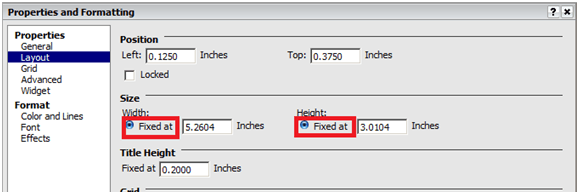
In Strategy 9.x and 10.x, the option "Fit to contents" is disappeared in Properties and Formatting dialog when the option "Show Title Bar" is enabled for a grid in a Report Services document, as shown below:
 

ka02R000000kVbIQAU_0EM440000002DH2.png


CAUSE:
 
This is working as designed.
 
When the grid title bar is shown, the grid goes into "Portal Window" mode, its dimensions become fixed. The option "Fit to contents" for grid does not apply, and it is hidden in Properties and Formatting dialog.
 
 
ACTION:
 
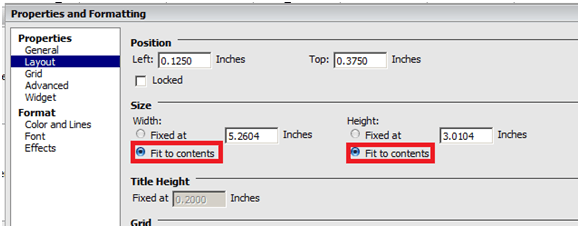
Un-check “Show Title Bar” option in Properties and Formatting dialog for the grid, as shown below:


ka02R000000kVbIQAU_0EM440000002DHF.png

 
The option “Fit to contents” is available, as shown below:
 

ka02R000000kVbIQAU_0EM440000002DGz.png

Comment

0 comments

Details

Knowledge Article

Published:

May 31, 2017

Last Updated:

May 31, 2017