SYMPTOM
To generate a list of unread History list messages in Strategy Web 9.x and see their cache hit status.
ACTION
Create a History list subscription to report (Charlie) through Web.
Messages appears in History List as bold (unread) with status ‘Ready’.
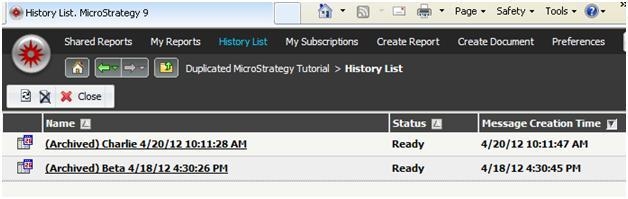
Using Strategy DB Query Tool, run the following SQL against the Enterprise Manager statistics tables database (SQL may have to be modified depending on database):
Sql
SELECT a11.DAY_ID as "DAY ID", max(a12.MESSAGETITLE) as Message_Title, max(a12.MESSAGEID) as Message_GUID, max(a12.USERNAME) as USER_NAME, max(a12.SUBSCRIPTIONID) as SUB_GUID, max(a11.SUBINSTNAME) as SUB_INSTANCE_NAME
FROM IS_MESSAGE_STATS a11, IS_INBOX_ACT_STATS a12
WHERE a12.MESSAGEID NOT IN (SELECT MESSAGEID FROM IS_INBOX_ACT_STATS WHERE INBOXACTION=6) AND a11.HISTORYLISTMESSAGEID=a12.MESSAGEID
AND a11.SESSIONID=a12.SESSIONID
//AND a11.DAY_ID BETWEEN '2012-01-30' AND '2012-02-03'
//AND a12.USERNAME='Administrator'
GROUP BY a12.MESSAGEID, a11.DAY_ID;
Report ‘Charlie’ is displayed as this has not been read.

The way to get this result is to uncheck the box for ‘The new scheduled report will overwrite older versions of itself’ in subscription ‘Advanced Options’.
Statistic table IS_CACHE_HIT_STATS can indicate cache hit status; and can be related to other two tables in the SQL via the following column.
Column Description
CACHESESSIONID GUID for user session
CACHEHITTYPE:
0 signifies report cache has been hit.
1 or 2 signifies document cache has been hit.
Run the following SQL to list messages where cache has been hit and to show cache hit status.
Sql
SELECT a11.DAY_ID as "DAY ID", max(a12.MESSAGETITLE) as Message_Title, max(a12.MESSAGEID) as Message_GUID, max(a12.USERNAME) as USER_NAME, max(a12.SUBSCRIPTIONID) as SUB_GUID, max(a11.SUBINSTNAME) as SUB_INSTANCE_NAME, a13.cachehittime,a13.cachehittype
FROM IS_MESSAGE_STATS a11, IS_INBOX_ACT_STATS a12, IS_CACHE_HIT_STATS a13
WHERE a12.MESSAGEID NOT IN (SELECT MESSAGEID FROM IS_INBOX_ACT_STATS WHERE INBOXACTION=6) AND a11.HISTORYLISTMESSAGEID=a12.MESSAGEID
AND a11.SESSIONID=a12.SESSIONID
and a12.SESSIONID=a13.cachesessionid
//AND a11.DAY_ID BETWEEN '2012-01-30' AND '2012-02-03'
//AND a12.USERNAME='Administrator'
GROUP BY a12.MESSAGEID, a11.DAY_ID, a13.cachehittime,a13.cachehittype;

From the above output we see that Cache Hit Type is ‘0’ which signifies that report cache has been hit..
Looking at report cache Quick View:

When the subscription is triggered, the report is executed and matching cache is created. To populate History list message, the matching cache is hit and that’s why we have a Hit Count of 1, and the message is displayed against the SQL run above.
Now, when caching is disabled for a new report ‘Delta’, and the above process is followed, the message is seen as unread in History list.

SQL to list unread messages in History list is run.

Report Cache Quick View shows Hit Count = 0

SQL to display Hit Cache status is run.

Message ‘Delta’ is not displayed as cache has not been hit. In this case what is happening is that the report is executed to populate history list message (no matching cache is created as caching is disabled) and then history cache is created. As a result Hit Count = 0.
