In Strategy 9.x-10.x, it is noticed that if adding the conditional metric filtering attribute into the report template which contains a filter restricting data on the same output attribute level, the local filter is ignored. And unchecking the “Remove related report filter elements” in the conditional metric advanced option reverses the result.
This technical note explain the reason for this behavior with an example.
STEPS TO RECREATE THIS SITUATION IN THE TUTORIAL PROJECT:
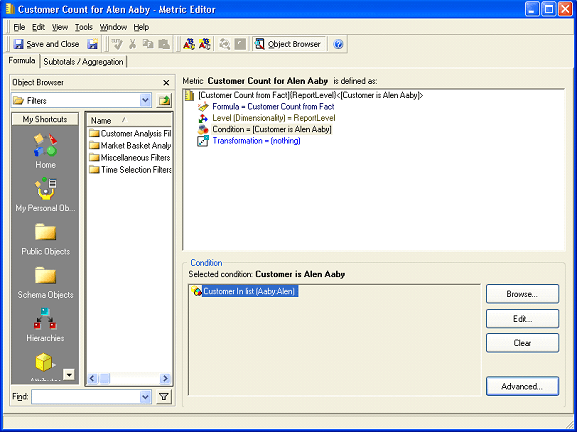
1. Create conditional metric called ‘Customer count For Alen Aaby’ with the formula ‘Count(Customer) {~+} <; @2; +>’ as shown below:
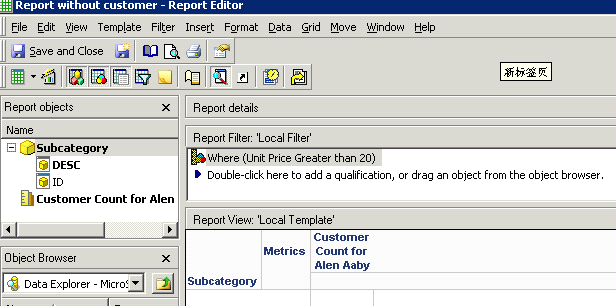
2. Create a report with attribute ‘Subcategory’ and the metric ‘Customer count For Alen Aaby’ in the template; add metric qualification with the definition of ‘Unit Price Greater than 20’ as report filter as show below:
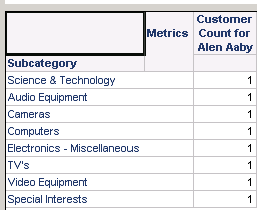
3. Execute the report returns correct data as shown below:
SQL Statements:
Pass0 - Execution Duration: 0:00:00.00
Data Fetch Duration from Datasource(s): 0:00:00.00
Total Data Fetch Duration: 0:00:00.00
Other Processing Duration: 0:00:00.03
create table ZZT3Y2IMORUMQ000 (
SUBCAT_ID SHORT)
Pass1 - Execution Duration: 0:00:00.00
Data Fetch Duration from Datasource(s): 0:00:00.00
Total Data Fetch Duration: 0:00:00.00
Other Processing Duration: 0:00:00.03
insert into ZZT3Y2IMORUMQ000
select a11. AS SUBCAT_ID
from a11
group by a11.
having avg(a11.) > 20.0
Pass2 - Execution Duration: 0:00:00.00
Data Fetch Duration from Datasource(s): 0:00:00.00
Total Data Fetch Duration: 0:00:00.00
Other Processing Duration: 0:00:00.03
Rows selected: 8
select pa12. AS SUBCAT_ID,
max(a13.) AS SUBCAT_DESC0,
count(a11.) AS WJXBFS1
from a11,
pa12,
a13
where pa12. = a13.
and a11. in (7796)
group by pa12.
Pass3 - Execution Duration: 0:00:00.00
Data Fetch Duration from Datasource(s): 0:00:00.00
Total Data Fetch Duration: 0:00:00.00
Other Processing Duration: 0:00:00.00
Pass4 - Execution Duration: 0:00:00.00
Data Fetch Duration from Datasource(s): 0:00:00.00
Total Data Fetch Duration: 0:00:00.00
Other Processing Duration: 0:00:00.03
drop table ZZT3Y2IMORUMQ000
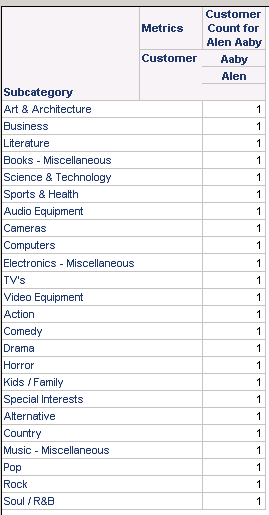
4. Add attribute ‘Customer’ into the template, the report filter is ignored as shown below:
SQL Statements:
Pass0 - Execution Duration: 0:00:00.01
Data Fetch Duration from Datasource(s): 0:00:00.00
Total Data Fetch Duration: 0:00:00.00
Other Processing Duration: 0:00:00.03
Rows selected: 24
select a12. AS SUBCAT_ID,
max(a12.) AS SUBCAT_DESC0,
a11. AS CUSTOMER_ID,
max(a11.) AS CUST_LAST_NAME,
max(a11.) AS CUST_FIRST_NAME,
count(a11.) AS WJXBFS1
from a11,
a12
where a11. in (7796)
group by a12.,
a11.
Pass1 - Execution Duration: 0:00:00.00
Data Fetch Duration from Datasource(s): 0:00:00.00
Total Data Fetch Duration: 0:00:00.00
Other Processing Duration: 0:00:00.00
The “Remove related report filter elements” setting is designed to “Influence the interaction between the metric filter and the report filter. By default, the setting is selected. If the report filter contains a qualification based on an attribute related to an attribute in the metric filter qualification, the metric filter qualification takes precedence.”
More details on “Conditional metric and report filter interactions” can be found in Strategy Product Manual, Advanced Reporting Guide.
In the above example, when users add attribute ‘Customer’ into the template, the metric qualification in the report filter - ‘Unit Price Greater than 20’ has an output level as {Customer, Subcategory}, and this filtering is treated to be related to the metric condition of “Customer count For Alen Aaby”, thus the “Remove related report filter elements” setting will take effect. Since it’s by default set to be checked, the report filter is wholly removed.
If there is only attribute ‘Subcategory’ on template, the metric qualification in the report filter - “Unit Price Greater than 20” has an output level as { Subcategory} which is not related to Customer, thus the “Remove related report filter elements” setting is not taking effect, thus expected data could be returned.
