EducationSoftwareStrategy.com
StrategyCommunity

Knowledge Base

Product

Community

Knowledge Base

TopicsBrowse ArticlesDeveloper Zone

Product

Download SoftwareProduct DocumentationSecurity Hub

Education

Tutorial VideosSolution GalleryEducation courses

Community

GuidelinesGrandmastersEvents
x_social-icon_white.svglinkedin_social-icon_white.svg
Strategy logoCommunity

© Strategy Inc. All Rights Reserved.

LegalTerms of UsePrivacy Policy
  1. Home
  2. Topics

KB39936: Is it possible to disable the display of the "Save Options" dialog box for a particular prompted report in Developer 9.x and 10.x


Stefan Zepeda

Salesforce Solutions Architect • Strategy


Is it possible to disable the display of the "Save Options" dialog box for a particular prompted report in Developer 9.x and 10.x

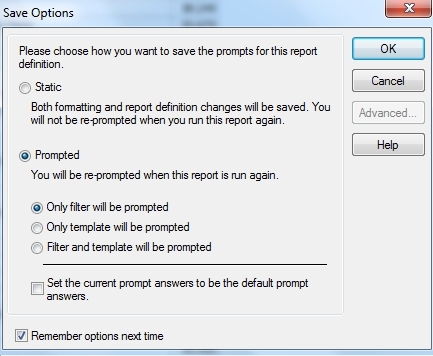
Is it possible to disable the display of the "Save Options" dialog box for a particular prompted report in Developer 9.x and 10.x?


ka02R000000kVapQAE_0EM440000002DGb.jpeg


This box currently appears by default on saving a prompted report and it is not possible to prevent it from being displayed.  An enhancement request has been logged to request that an option 'Do not ask me again' be incorporated into the dialog, in order to store the user's previous selection for the specific report in question.  Please contact Technical Support to request an update with regard to the status of this request.


Comment

0 comments

Details

Knowledge Article

Published:

May 31, 2017

Last Updated:

May 31, 2017