EducationSoftwareStrategy.com
StrategyCommunity

Knowledge Base

Product

Community

Knowledge Base

TopicsBrowse ArticlesDeveloper Zone

Product

Download SoftwareProduct DocumentationSecurity Hub

Education

Tutorial VideosSolution GalleryEducation courses

Community

GuidelinesGrandmastersEvents
x_social-icon_white.svglinkedin_social-icon_white.svg
Strategy logoCommunity

© Strategy Inc. All Rights Reserved.

LegalTerms of UsePrivacy Policy
  1. Home
  2. Topics

KB39955: Date value formatting is changed to text in Excel 2007 when report is executed in MicroStrategy Office 9.x


Community Admin

• Strategy


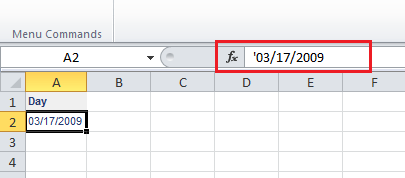
When an attribute is imported into Excel 2007, the values are imported as text, as shown in the following screen shot. The apostrophe in the cell formula indicates a text formatting

SYMPTOM:
When an attribute is imported into Excel 2007, the values are imported as text, as shown in the following screen shot. The apostrophe in the cell formula indicates a text formatting:
 

ka04W000000Ogw8QAC_0EM4400000027Ad.png

 
CAUSE:
This is the default behavior in Strategy Office
 
ACTION:
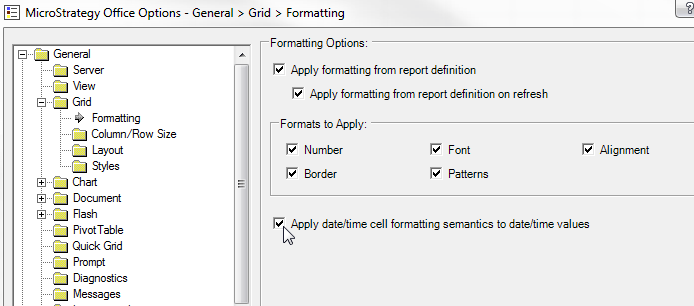
To allow date elements to be imported with date format, enable the following check box in the Strategy Office Options under General > Grid > Formatting > Apply date/time cell formatting semantics to date/time values
 

ka04W000000Ogw8QAC_0EM4400000027Ae.png

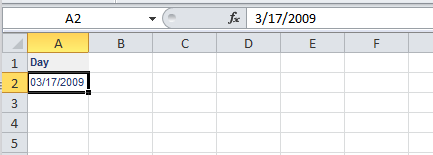
Now the elements should return with date formatting:
ka04W000000Ogw8QAC_0EM4400000027Aa.png

Comment

0 comments

Details

Knowledge Article

Published:

June 7, 2017

Last Updated:

June 7, 2017