SYMPTOM:
When users try to create a custom metric formula in MDX to implement a transformation by the following the technical note below,
KB16096:How to write a custom metric formula in MDX to implement a transformation in MicroStrategy Engine
it fails with the error message as below.
Error: SQL Generation Complete QueryEngine encountered error: ExecQuery failed. MDX Execution failed. Error type: JCO layer error. JCOStatement.executeQuery failed. java.lang.Exception: Error during MDX Query Execution Error during Bapi Execution: Invalid MDX command with , at com.Strategy.Database.JCO.JCOStatement2.executeQuery(Unknown Source). Connection String: N/A;. Connection String: N/A;. SQL Statement: with member . as '(,.CurrentMember.PrevMember)' set as '{..members}' select {.} on columns, non empty on rows from cell properties CELL_ORDINAL, FORMATTED_VALUE, VALUE, FORMAT_STRING .. Error in Process method of Component: QueryEngineServer, Project Strategy Tutorial, Job 350, Error Code= -2147212544.
CAUSE:
One possible cause is that the wrong usage of the hierarchy name of the SAP BW cube. Like the example above, the metric is defined as below.
"(,.CurrentMember.PrevMember)" {~}
Note: Technical Names of the hierarchy is required to be used.
ACTION:
Click on the "Show Technical Names" to get the technical name for compound metric creation.
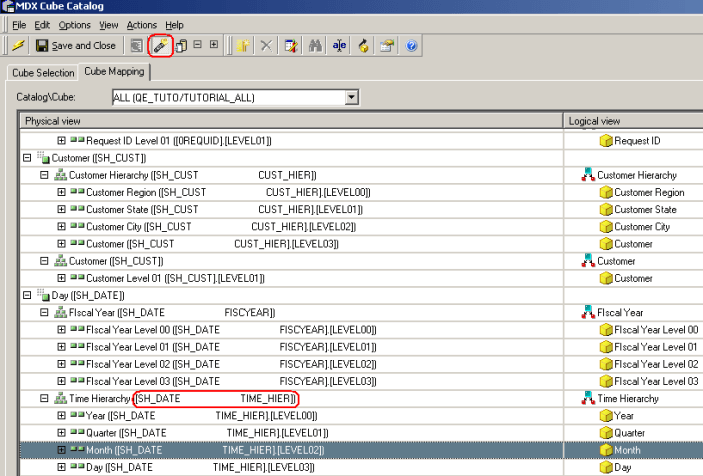
For example, the metric to return previous date value should be defined as below.
"(.,.CurrentMember.PrevMember)" {~}
KB422277
