EducationSoftwareStrategy.com
StrategyCommunity

Knowledge Base

Product

Community

Knowledge Base

TopicsBrowse ArticlesDeveloper Zone

Product

Download SoftwareProduct DocumentationSecurity Hub

Education

Tutorial VideosSolution GalleryEducation courses

Community

GuidelinesGrandmastersEvents
x_social-icon_white.svglinkedin_social-icon_white.svg
Strategy logoCommunity

© Strategy Inc. All Rights Reserved.

LegalTerms of UsePrivacy Policy
  1. Home
  2. Topics

KB39990: How to use ApplySimple to create attribute form to support sorting configuration in the attribute editor in MicroStrategy Desktop and Web 9.0.2


Community Admin

• Strategy


A known issue that attribute sorting does not get applied correctly is introduced in the technical note below:
 
KB35312: Attribute sorting does not get applied correctly on a selector when viewing a Report Services Document in DHTML mode in MicroStrategy Web 9.0.x
 
However, by taking advantage of the ApplySimple expression, the attribute sorting can get applied correctly in Strategy Desktop and Web 9.0.2.
 
Example:
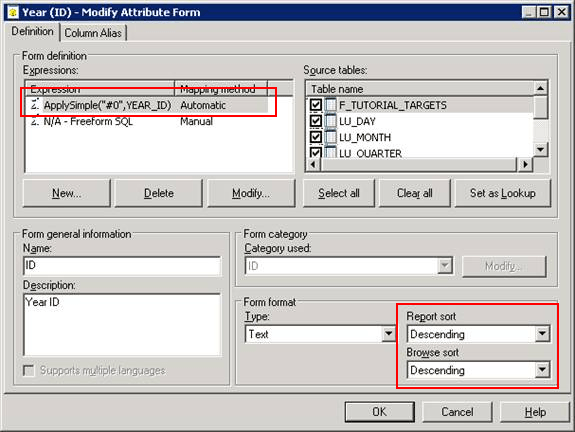
  • Map an Applysimple expression to the ID form of Year attribute, as shown below: 
ka04W000000OcYjQAK_0EM440000002HON.png
  •  

    Sample Code/Error
    applysimple("#0",YEAR_ID)

     
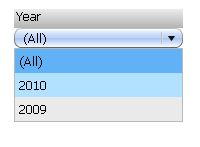
  • The sorting order of Year attribute in a selector in a similar Report Services Document get applied correctly, as shown below.
     
ka04W000000OcYjQAK_0EM440000002HOI.png


Comment

0 comments

Details

Knowledge Article

Published:

May 15, 2017

Last Updated:

May 15, 2017