EducationSoftwareStrategy.com
StrategyCommunity

Knowledge Base

Product

Community

Knowledge Base

TopicsBrowse ArticlesDeveloper Zone

Product

Download SoftwareProduct DocumentationSecurity Hub

Education

Tutorial VideosSolution GalleryEducation courses

Community

GuidelinesGrandmastersEvents
x_social-icon_white.svglinkedin_social-icon_white.svg
Strategy logoCommunity

© Strategy Inc. All Rights Reserved.

LegalTerms of UsePrivacy Policy
  1. Home
  2. Topics

KB40014: Data Manipulation Language (DML) upgrade for Enterprise Manager Warehouse


Community Admin

• Strategy


The DML upgrade of the Enterprise Manager Warehouse must be performed after the DDL upgrade i.e. upgrade via the Enterprise Manager Console in 9.4.x.

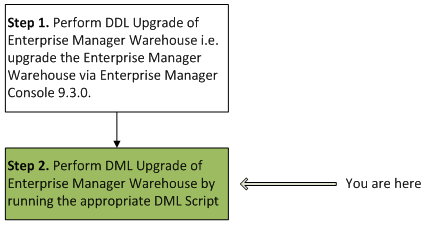
The DML upgrade of the Enterprise Manager Warehouse must be performed after the DDL upgrade i.e. upgrade via the Enterprise Manager Console in 9.4.x. The information provided in this technical note pertains to step 2 as shown below:
 

ka04W000000Oe2bQAC_0EM4400000029mQ.png


Prerequisites for running a DML script:

  1. DDL upgrade of the Enterprise Manager Warehouse i.e. upgrade via Enterprise Manager Console 9.3.0 - 9.4.x is completed.
  2. Create a backup of the Enterprise Manager Warehouse before running the DML scripts.

 
Purpose of the DML script:
In Strategy 9.3.0, a new column named 'IS_REPOSITORY_ID' is created during the DDL upgrade of the Enterprise Manager Warehouse and has been added to the following tables:

  1. IS_REP_FACT
  2. IS_DOC_FACT
  3. IS_SESSION
  4. IS_PROJECT_FACT_1

The DML script populates the newly created IS_REPOSITORY_ID column in each table listed above.
 
The DML script contains the following workflow at a high level:

  • Populates the IS_REPOSITORY_ID column in each table listed above by joining to the Enterprise Manager Warehouse table IS_SERVER

Note: The DML scripts should ONLY be run once after upgrading to Strategy Enterprise Manager 9.3.x - 9.4.x. In other words, if users are upgrading from version 9.3.x - 9.4.x and the DML scripts were already run when they upgraded to 9.3.x, it is not necessary to run the scripts again.
 
Location of the DML script:
DML scripts for all databases can be found at the following two locations:

  1. At the end of this Technical Note
  2. <Installation Folder>\MicroStrategy\Enterprise Manager\DML Scripts

Users should download the appropriate zip file based on the type of database where their Enterprise Manager Warehouse is located. As an example, for Microsoft SQL Server, download the file SQLSERVER DML EM WH.zip


Requirements and Best Practices:

  1. Before running the DML script, purge all unnecessary data from the Enterprise Manager Warehouse tables. Ensure that only the most recent data is kept if possible. This will also improve overall performance.
  2. Ensure that an Enterprise Manager data load is not scheduled or currently going on which may coincide with the execution of the DML script.
  3. The duration of execution for the DML scripts will depend on the amount of data in the Enterprise Manager tables and this is the reason for not including the DML script as part of the DDL upgrade process i.e. upgrade of the Enterprise Manager Warehouse via the Enterprise Manager Console 9.3.0 - 9.4.x.
  4. For best performance, run the DML scripts when the load on the database server is low.
  5. Run the DML script against the Enterprise Manager Warehouse from a database client application such as Strategy DB Query Tool or any native SQL execution tool provided by the database. Make sure that the Intelligence Server is stopped while performing this DML upgrade.


ka04W000000Oe2bQAC_0EM4400000029mM.png


DML Scripts for Download:

ka04W000000Oe2bQAC_0EM4400000029mT.png

DB2 DML EM WH
 

ka04W000000Oe2bQAC_0EM4400000029mT.png

ORACLE DML EM WH
 

ka04W000000Oe2bQAC_0EM4400000029mT.png

SQLSERVER DML EM WH
 

ka04W000000Oe2bQAC_0EM4400000029mT.png

SYBASE DML EM WH
 

ka04W000000Oe2bQAC_0EM4400000029mT.png

TERADATA DML EM WH


Upgrade Scripts Modification:
WARNING:
Manually editing values in the upgrade scripts may cause serious, database-wide problems that may make your Enterprise Manager project unusable. Since these are user-initiated changes, they are not covered by any Strategy warranty.


Comment

0 comments

Details

Knowledge Article

Published:

April 3, 2017

Last Updated:

April 3, 2017