EducationSoftwareStrategy.com
StrategyCommunity

Knowledge Base

Product

Community

Knowledge Base

TopicsBrowse ArticlesDeveloper Zone

Product

Download SoftwareProduct DocumentationSecurity Hub

Education

Tutorial VideosSolution GalleryEducation courses

Community

GuidelinesGrandmastersEvents
x_social-icon_white.svglinkedin_social-icon_white.svg
Strategy logoCommunity

© Strategy Inc. All Rights Reserved.

LegalTerms of UsePrivacy Policy
  1. Home
  2. Topics

KB40078: "Index out of Range" error message appears when Editing a subscription in MicroStrategy Web 9.x after modifying an attribute's ID form from a compound key to non-compound key


Community Admin

• Strategy


"Index out of Range" error message appears when Editing a subscription in MicroStrategy Web 9.x after modifying an attribute's ID form from a compound key to non-compound key

SYMPTOM:
 
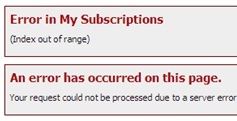
"Index out of Range" error message is returned in Strategy Web 9.x when trying to edit a subscription that uses an attribute that previously had a compound key, to one that no longer uses a compound key.
 

ka04W000000OcvYQAS_0EM44000000279l.jpeg

 
CAUSE:
 
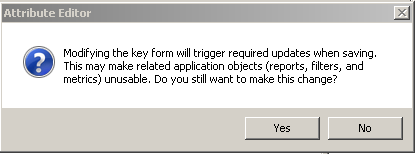
Changing the schema in this manner will affect all objects that depend on this attribute such as subscriptions, filters and prompts. In the case for subscriptions, both values for the compound key are stored in the definition of its personalization (prompt answer). When trying to edit the subscription, the "Index out of Range" error is displayed because one of the values in the prompt answer does not point to any attribute form.
 
This is the reason for the warning when trying to modify the attribute ID:
ka04W000000OcvYQAS_0EM44000000279n.png

 
ACTION:
Since by changing the ID form of the attribute (compound to single key), the attribute has become a new attribute, personalizations based on that attribute may no longer continue to work and should be recreated.


Comment

0 comments

Details

Knowledge Article

Published:

June 24, 2017

Last Updated:

June 24, 2017