EducationSoftwareStrategy.com
StrategyCommunity

Knowledge Base

Product

Community

Knowledge Base

TopicsBrowse ArticlesDeveloper Zone

Product

Download SoftwareProduct DocumentationSecurity Hub

Education

Tutorial VideosSolution GalleryEducation courses

Community

GuidelinesGrandmastersEvents
x_social-icon_white.svglinkedin_social-icon_white.svg
Strategy logoCommunity

© Strategy Inc. All Rights Reserved.

LegalTerms of UsePrivacy Policy
  1. Home
  2. Topics

KB40088: Users cannot see existing or create new Documents in MicroStrategy Web 9.2.1


Community Admin

• Strategy


Users cannot see existing or create new Documents in MicroStrategy Web 9.2.1

SYMPTOM:
 
The option to view or create Documents isn't visible in Strategy Web 9.2.1.                                                        

ka04W000000ObXfQAK_0EM44000000279G.png


CAUSE:
 
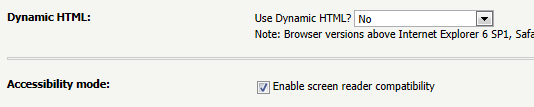
One of the possible causes is because "Use Dynamic HTML?" is set to NO.                  
ka04W000000ObXfQAK_0EM44000000279K.png


If this setting was not switched on purpose, a possible cause for it to be set to 'No' is that the Accessibility mode option to 'Enable screen reader compatibility' is on.                                         
 
 
ACTION:
 
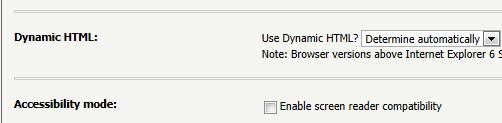
In Web Preferences > General, disable Accessibility mode and turn Use Dynamic HTML to "Determine automatically" as shown below.                                                         
ka04W000000ObXfQAK_0EM44000000279E.png


Refer to KB6988 for more information on Dynamic HTML and Accessibility mode.
 
 
44127


Comment

0 comments

Details

Knowledge Article

Published:

July 16, 2017

Last Updated:

April 10, 2018