EducationSoftwareStrategy.com
StrategyCommunity

Knowledge Base

Product

Community

Knowledge Base

TopicsBrowse ArticlesDeveloper Zone

Product

Download SoftwareProduct DocumentationSecurity Hub

Education

Tutorial VideosSolution GalleryEducation courses

Community

GuidelinesGrandmastersEvents
x_social-icon_white.svglinkedin_social-icon_white.svg
Strategy logoCommunity

© Strategy Inc. All Rights Reserved.

LegalTerms of UsePrivacy Policy
  1. Home
  2. Topics

KB40130: Output for a custom group with two filters in the definition of a single element using the formatting option "Show only the individual items within this element" results in a concatenation when executing reports from Developer 9.x and 10.x


Stefan Zepeda

Salesforce Solutions Architect • Strategy


KB40130: Output for a custom group with two filters in the definition of a single element using the formatting option "Show only the individual items within this element" results in a concatenation when executing reports from Developer 9.x and 10.x

SYMPTOM:
 
After defining a custom group, in which two filters are used in the definition of one element, users may note that the output of the report in Desktop 9.2.1 or 9.2.1m is a concatenation of the results for each individual criterion.
 
STEPS TO REPRODUCE:

  • In Developer 9.x and 10.x, create a custom group consisting of two elements, each of which should incorporate more than one filter criterion:

ka02R000000kXF3QAM_0EM440000002DER.jpeg
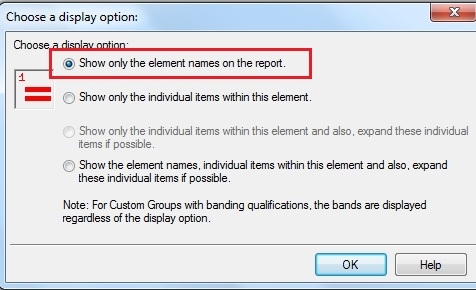
  • Set the formatting for the first element to "Show only the individual items within this element" and select "Show only the element names on the report" for the second:

    First element:

ka02R000000kXF3QAM_0EM440000002DEZ.jpeg
  • Second element:

ka02R000000kXF3QAM_0EM440000002DET.jpeg
  • Create a report containing the above custom group and any metric:

ka02R000000kXF3QAM_0EM440000002DEn.jpeg
  • Execute the report from the Desktop interface and note that the output for the first custom group element is a concatenation of the results of each individual filtering criterion:

ka02R000000kXF3QAM_0EM440000002DEl.jpeg
  • In the above case, both the customer name and the region are visible in the field, corresponding to the two filters defined within the first custom group element.
     
  • Review the output for the second custom group, which displays only the name of the element concerned:

ka02R000000kXF3QAM_0EM440000002DEW.jpeg

CAUSE:
 
This represents the expected behaviour when using the formatting option "Show only the individual items within this element" for custom groups containing more than one filtering criterion.
 
ACTION:
 
Users may wish to consider selecting the "Show only the element names on the report" setting in order to avoid encountering this behaviour.


Comment

0 comments

Details

Knowledge Article

Published:

June 20, 2017

Last Updated:

June 20, 2017