EducationSoftwareStrategy.com
StrategyCommunity

Knowledge Base

Product

Community

Knowledge Base

TopicsBrowse ArticlesDeveloper Zone

Product

Download SoftwareProduct DocumentationSecurity Hub

Education

Tutorial VideosSolution GalleryEducation courses

Community

GuidelinesGrandmastersEvents
x_social-icon_white.svglinkedin_social-icon_white.svg
Strategy logoCommunity

© Strategy Inc. All Rights Reserved.

LegalTerms of UsePrivacy Policy
  1. Home
  2. Topics

KB40142: How to purge Change Journal entries for a specific project in MicroStrategy 9.x?


Stefan Zepeda

Salesforce Solutions Architect • Strategy


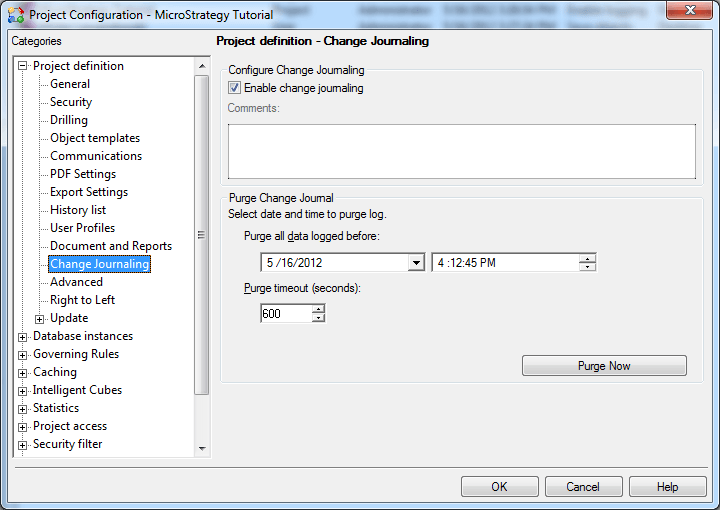
The following procedure describes how to purge entries from the Change Journal for a single project, in MicroStrategy 9.x.

The following procedure describes how to purge entries from the Change Journal for a single project, in Strategy 9.x:
1. In Developer, right-click on the project and select Project Configuration.
2. Under Project Definition, select Change Journaling.
3. Select the date and time. All the Change Journaling entries created before that date will be removed.
ka02R000000kbyWQAQ_0EM440000002DEA.png

4. Click on Purge Now.


Comment

0 comments

Details

Knowledge Article

Published:

June 5, 2017

Last Updated:

June 5, 2017