EducationSoftwareStrategy.com
StrategyCommunity

Knowledge Base

Product

Community

Knowledge Base

TopicsBrowse ArticlesDeveloper Zone

Product

Download SoftwareProduct DocumentationSecurity Hub

Education

Tutorial VideosSolution GalleryEducation courses

Community

GuidelinesGrandmastersEvents
x_social-icon_white.svglinkedin_social-icon_white.svg
Strategy logoCommunity

© Strategy Inc. All Rights Reserved.

LegalTerms of UsePrivacy Policy
  1. Home
  2. Topics

KB40149: When using a Hierarchy Prompt in the report filter Date attributes will not move over to the definition side when drag and dropped against SQL Server warehouse while using MicroStrategy 9.x and 10.x


Stefan Zepeda

Salesforce Solutions Architect • Strategy


When using a Hierarchy Prompt in the report filter Date attributes will not move over to the definition side when drag and dropped against SQL Server warehouse while using MicroStrategy 9.x and 10.x

SYMPTOM:
 
When running a report which has a hierarchy prompt and dragging a date attribute element to the filter definition, the expression is not actually added.  The user will see open and close parenthesis without any element listed inside them. i.e. ()
 
The view of the hierarchy prompt:
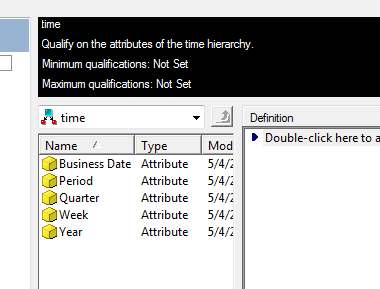
ka02R000000kc3tQAA_0EM440000002DEQ.png


After dragging the date element into the filter definition: (notice the empty parenthesis)
 

ka02R000000kc3tQAA_0EM440000002DEV.png

 
CAUSE:
 
This is a known issue with Strategy version 9.2.1
 
ACTION:
 
Contact Strategy Technical Support for an update on the issue.
 
WORKAROUND:
 
The users can successfully create the filter by doing an elements In List selection.  This will successfully add the element to the filter.
 

ka02R000000kc3tQAA_0EM440000002DEY.png


Comment

0 comments

Details

Knowledge Article

Published:

May 30, 2017

Last Updated:

May 30, 2017