EducationSoftwareStrategy.com
StrategyCommunity

Knowledge Base

Product

Community

Knowledge Base

TopicsBrowse ArticlesDeveloper Zone

Product

Download SoftwareProduct DocumentationSecurity Hub

Education

Tutorial VideosSolution GalleryEducation courses

Community

GuidelinesGrandmastersEvents
x_social-icon_white.svglinkedin_social-icon_white.svg
Strategy logoCommunity

© Strategy Inc. All Rights Reserved.

LegalTerms of UsePrivacy Policy
  1. Home
  2. Topics

KB40161: "Windows could not start the MicroStrategy Master Health Agent on Local Computer ... refer to service-specific error code -6" error message appears when starting Master Health Agent on a Windows machine.


Community Admin

• Strategy


Master Health Agent service fails to start in Windows Services manager with the error: "Windows could not start the MicroStrategy Master Health Agent on Local Computer ... refer to service-specific error code -6". Health Center XML files may contain incorrect xml format.

SYMPTOM:
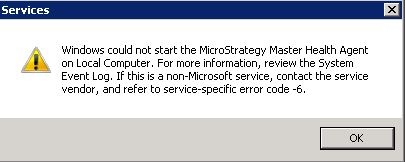
Master Health Agent service fails to start in Windows Services manager with the error below:
 

ka04W000000OeqHQAS_0EM4400000029ln.jpeg


Windows could not start the Strategy Master Health Agent on Local Computer. For more information, review the System Event Log. If this is a non-Microsoft service, contact the service vendor, and refer to service-specific error code -6.

  
CAUSE:
One possible cause is that the XML files under the folder \Common Files\MicroStrategy\Health Center\ may contain incorrect xml format. For example, if ConfigWiz.xml cannot be properly parsed by Firefox browser, the user will see the error below:
 

ka04W000000OeqHQAS_0EM4400000029lX.jpeg


XML Parsing Error: mismatched tag. Expected: </NodeType>.
Location: file:///C:/Program%20Files%20(x86)/Common%20Files/MicroStrategy/Health%20Center/aps-921mwin2k8/ConfigWiz.xml
Line Number 1, Column 826:<ConfigWiz><NodeType>Master Health Agent<NodeType><InstallationPath>C:\Program Files (x86)\Common Files\MicroStrategy\Health Center</InstallationPath><Network><Address>aps-921mwin2k8</Address><Port>44440</Port></Network><RepositoryPath>C:\Users\TechSupp\Documents\Repository</RepositoryPath><LowerInclusiveRetryInterval>240</LowerInclusiveRetryInterval><UpperInclusiveRetryInterval>1200</UpperInclusiveRetryInterval><ProxySettings><ProxyEnabled>false</ProxyEnabled><ProxyHostName/><ProxyPort>0</ProxyPort><ProxyAuthEnabled>false</ProxyAuthEnabled><ProxyUserID/><ProxyPWD>000000015953794f08ab85ce692cb5048de9676cc911585a21d540d69f0fb588d179f55635ad0d5f</ProxyPWD></ProxySettings><KIDetectors><WebUniversal><onoff>default</onoff></WebUniversal><WebServicesUniversal><onoff>default</onoff></WebServicesUniversal></KIDetectors></ConfigWiz> 

 
ACTION:
In order to pin point the problematic XML files, please load each XML file into any browser (IE, Firefox, Chrome..etc.) and fix the errors accordingly. In the example above, the problem is the XML tag "<NodeType>" does not have a matching closing tag "</NodeType>"


Comment

0 comments

Details

Knowledge Article

Published:

June 5, 2017

Last Updated:

June 5, 2017