EducationSoftwareStrategy.com
StrategyCommunity

Knowledge Base

Product

Community

Knowledge Base

TopicsBrowse ArticlesDeveloper Zone

Product

Download SoftwareProduct DocumentationSecurity Hub

Education

Tutorial VideosSolution GalleryEducation courses

Community

GuidelinesGrandmastersEvents
x_social-icon_white.svglinkedin_social-icon_white.svg
Strategy logoCommunity

© Strategy Inc. All Rights Reserved.

LegalTerms of UsePrivacy Policy
  1. Home
  2. Topics

KB40174: Images as attribute forms on a grid do not sort properly when the grid is exported to Excel from MicroStrategy Web 9.2.1


Community Admin

• Strategy


SYMPTOM:
After exporting a grid to Microsoft Excel using Strategy Web 9.2.1, images used as an attribute form on the grid are not sorted when using Excel's sort function.
 
STEPS TO REPRODUCE:
Follow these steps to reproduce in a Strategy Tutorial project.
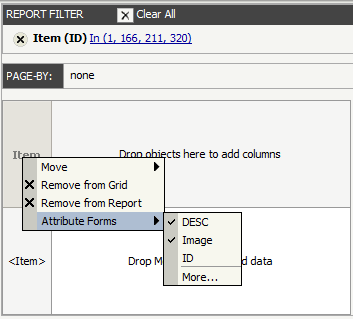
  • In Strategy Web 9.2.1, create a report with the Item attribute.
  • Apply a filter on ID's: 1, 166, 211, and 320.
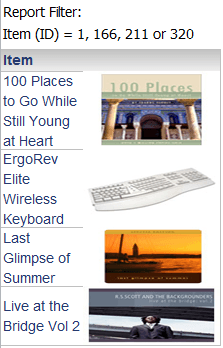
  • Display the attribute forms: DESC and Image:
ka04W000000Ocg9QAC_0EM440000002798.png
  • Execute the report.
  • Export the report to Excel.
ka04W000000Ocg9QAC_0EM44000000279B.png
  • Highlight the grid in Excel.
  • Right-click on the selection and Sort Z to A.
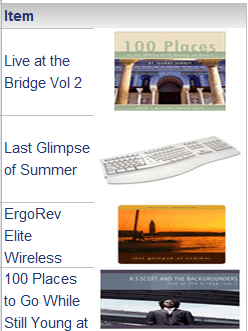
  • Notice that the DESC form sorts properly while the Image attribute form stays the same:
ka04W000000Ocg9QAC_0EM440000002796.png

CAUSE:
This is a known issue in Strategy Web 9.2.1.
 
ACTION:
Contact Strategy Technical Support for an update on the status of this issue.


Comment

0 comments

Details

Knowledge Article

Published:

July 18, 2017

Last Updated:

July 18, 2017