SYMPTOM:
In Strategy 9..4.x, report errors with SQL Global Optimization level 2 or 3 or 4, but executes successfully with Level 0 or level 1 as shown below:

Following entries are caught in the DSSErrors.log:
QueryEngine encountered error: Unspecified exception caught in Query Engine..
(SQL Generation CompleteQueryEngine encountered error: Unspecified exception caught in Query Engine.. Error in Process method of Component: QueryEngineServer, Project Strategy Tutorial, Job 516, Error Code= -2147212544.)

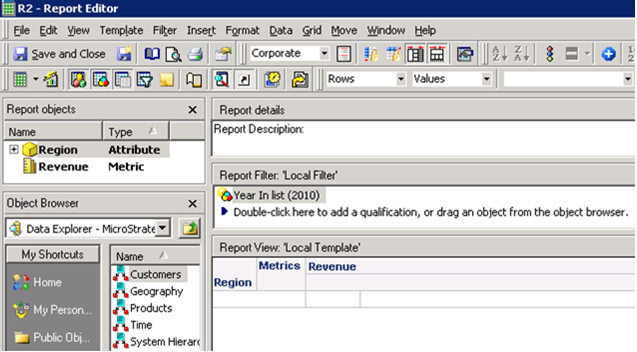
b. Another report to get all region by revenue in Year 2010 called R2. {A duplicate of the first report without the ranking metric}
With Region in row and metric Revenue in column, add an attribute qualification limiting to year 2010 as shown below:
2. Create a custom Group called CG.
a. Create 2 elements
b. Add shortcut to report R1 to Element 1 (Display Individual Item Only)
Right mouse click the Element 1, select Show Display Options>check “Show only the individual items within this element”
c. Include Report R2 to Element 2 (Display Element Name Only)
Right mouse click the Element 2, select Show Display Options>check “Show only the element names on the report”
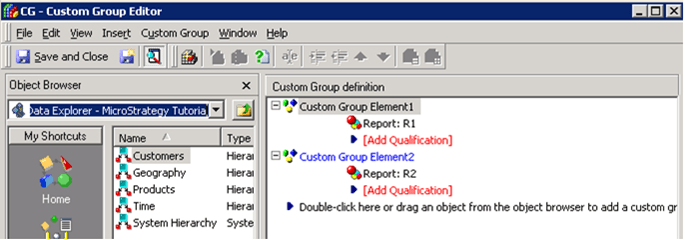
3. Insert the custom group created in step 2 into a new report called R3. Include Sales Amount to report template and Year 2010 to the report filter. Make sure the VLDB property "SQL Global Optimization" level 2 or 3 or 4 is selected. Execute the report get below error:
4. However if report set to be with Global Optimization level 1, report executes successfully as shown below:

CAUSE:
This is a known issue with Strategy 9.x
ACTION:
Please contact Strategy Technical Support for an update with this issue.
WORKAROUND:
Set VLDB property "SQL Global Optimization" level 1 or 0 at report level.
The Strategy Internal Reference Number for the issue discussed in this technical note is 424006.
