SYMPTOM:
In Strategy 9.x-10.x, when executing a report against Teradata warehouse with SQL Global Optimization level 4, the following error is obtained:
The following error occurs in pass 2: Execute Query failed.
Error type: Odbc error. Odbc operation attempted: SQLExecDirect. Duplication of column XXX in a table, derived table, view, macro or trigger.
All the metrics in the report share the same column alias. And in the SQL view, duplicated column names are observed in the temporary table. With SQL Global Optimization level 2, the report runs successfully.
STEPS TO REPRODUCE IN THE TUTORIAL PROJECT:
1. Set the Tutorial warehouse type to be Teradata;
2. Create 11 filters qualifying on the Subcategory ID with definitions as shown below:
Subcategory@ID=1
Subcategory@ID=2
Subcategory@ID=3
Subcategory@ID=4
Subcategory@ID=5
Subcategory@ID=6
Subcategory@ID=7
Subcategory@ID=8
Subcategory@ID=9
Subcategory@ID=10
Subcategory@ID=11

3. Create 11 conditional metrics with definitions as shown below:
Sum(Cost) {~+} <; @2; ->
Sum(Cost) {~+} <; @2; ->
Sum(Cost) {~+} <; @2; ->
Sum(Cost) {~+} <; @2; ->
Sum(Cost) {~+} <; @2; ->
Sum(Cost) {~+} <; @2; ->
Sum(Cost) {~+} <; @2; ->
Sum(Cost) {~+} <; @2; ->
Sum(Cost) {~+} <; @2; ->
Sum(Cost) {~+} <; @2; ->
Sum(Cost) {~+} <; @2; ->
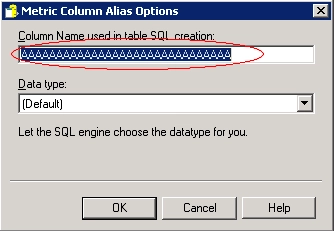
And set all 11 metrics column alias to be “AAAAAAAAAAAAAAAAAAAAAAAAAAAAAA” (30 characters)

4. Create report called R1 with attribute Category and the 11 metrics in column as shown below:

5. Run the report and check the SQL view; Part of the SQL is as below:
Sql
select pa111.CATEGORY_ID CATEGORY_ID,
a112.CATEGORY_DESC CATEGORY_DESC0,
pa111.AAAAAAAAAAAAAAAAAAAAAAAAAAAAAA AAAAAAAAAAAAAAAAAAAAAAAAAAAAAA,
pa111.AAAAAAAAAAAAAAAAAAAAAAAAAAAAA1 AAAAAAAAAAAAAAAAAAAAAAAAAAAAA1,
pa111.AAAAAAAAAAAAAAAAAAAAAAAAAAAAA2 AAAAAAAAAAAAAAAAAAAAAAAAAAAAA2,
pa111.AAAAAAAAAAAAAAAAAAAAAAAAAAAAA3 AAAAAAAAAAAAAAAAAAAAAAAAAAAAA3,
pa111.AAAAAAAAAAAAAAAAAAAAAAAAAAAAA4 AAAAAAAAAAAAAAAAAAAAAAAAAAAAA4,
pa111.AAAAAAAAAAAAAAAAAAAAAAAAAAAAA5 AAAAAAAAAAAAAAAAAAAAAAAAAAAAA5,
pa111.AAAAAAAAAAAAAAAAAAAAAAAAAAAAA6 AAAAAAAAAAAAAAAAAAAAAAAAAAAAA6,
pa111.AAAAAAAAAAAAAAAAAAAAAAAAAAAAA7 AAAAAAAAAAAAAAAAAAAAAAAAAAAAA7,
pa111.AAAAAAAAAAAAAAAAAAAAAAAAAAAAA8 AAAAAAAAAAAAAAAAAAAAAAAAAAAAA8,
pa111.AAAAAAAAAAAAAAAAAAAAAAAAAAAAA9 AAAAAAAAAAAAAAAAAAAAAAAAAAAAA9,
pa111.AAAAAAAAAAAAAAAAAAAAAAAAAAAAAa AAAAAAAAAAAAAAAAAAAAAAAAAAAAAa
from (select a12.CATEGORY_ID CATEGORY_ID,
sum((Case when a11.SUBCAT_ID = 1 then a11.TOT_COST else NULL end)) AAAAAAAAAAAAAAAAAAAAAAAAAAAAAA,
max((Case when a11.SUBCAT_ID = 1 then 1 else 0 end)) GODWFLAG1_1,
sum((Case when a11.SUBCAT_ID = 2 then a11.TOT_COST else NULL end)) AAAAAAAAAAAAAAAAAAAAAAAAAAAAA1,
max((Case when a11.SUBCAT_ID = 2 then 1 else 0 end)) GODWFLAG2_1,
sum((Case when a11.SUBCAT_ID = 3 then a11.TOT_COST else NULL end)) AAAAAAAAAAAAAAAAAAAAAAAAAAAAA2,
max((Case when a11.SUBCAT_ID = 3 then 1 else 0 end)) GODWFLAG3_1,
sum((Case when a11.SUBCAT_ID = 4 then a11.TOT_COST else NULL end)) AAAAAAAAAAAAAAAAAAAAAAAAAAAAA3,
max((Case when a11.SUBCAT_ID = 4 then 1 else 0 end)) GODWFLAG4_1,
sum((Case when a11.SUBCAT_ID = 5 then a11.TOT_COST else NULL end)) AAAAAAAAAAAAAAAAAAAAAAAAAAAAA4,
max((Case when a11.SUBCAT_ID = 5 then 1 else 0 end)) GODWFLAG5_1,
sum((Case when a11.SUBCAT_ID = 10 then a11.TOT_COST else NULL end)) AAAAAAAAAAAAAAAAAAAAAAAAAAAAA5,
max((Case when a11.SUBCAT_ID = 10 then 1 else 0 end)) GODWFLAG6_1,
sum((Case when a11.SUBCAT_ID = 6 then a11.TOT_COST else NULL end)) AAAAAAAAAAAAAAAAAAAAAAAAAAAAA6,
max((Case when a11.SUBCAT_ID = 6 then 1 else 0 end)) GODWFLAG7_1,
sum((Case when a11.SUBCAT_ID = 7 then a11.TOT_COST else NULL end)) AAAAAAAAAAAAAAAAAAAAAAAAAAAAA7,
max((Case when a11.SUBCAT_ID = 7 then 1 else 0 end)) GODWFLAG8_1,
sum((Case when a11.SUBCAT_ID = 8 then a11.TOT_COST else NULL end)) AAAAAAAAAAAAAAAAAAAAAAAAAAAAA8,
max((Case when a11.SUBCAT_ID = 8 then 1 else 0 end)) GODWFLAG9_1,
sum((Case when a11.SUBCAT_ID = 9 then a11.TOT_COST else NULL end)) AAAAAAAAAAAAAAAAAAAAAAAAAAAAA9,
max((Case when a11.SUBCAT_ID = 9 then 1 else 0 end)) GODWFLAGa_1,
sum((Case when a11.SUBCAT_ID = 11 then a11.TOT_COST else NULL end)) AAAAAAAAAAAAAAAAAAAAAAAAAAAAAa,
max((Case when a11.SUBCAT_ID = 11 then 1 else 0 end)) GODWFLAGb_1
from CITY_SUBCATEG_SLS a11
join LU_SUBCATEG a12
on (a11.SUBCAT_ID = a12.SUBCAT_ID)
where (a11.SUBCAT_ID = 1
or a11.SUBCAT_ID = 2
or a11.SUBCAT_ID = 3
or a11.SUBCAT_ID = 4
or a11.SUBCAT_ID = 5
or a11.SUBCAT_ID = 10
or a11.SUBCAT_ID = 6
or a11.SUBCAT_ID = 7
or a11.SUBCAT_ID = 8
or a11.SUBCAT_ID = 9
or a11.SUBCAT_ID = 11)
group by a12.CATEGORY_ID
) pa111
join LU_CATEGORY a112
NOTE: Because of duplicated column name confliction, Strategy SQL Engine changes the column name to end with 1, 2, 3, 4, 5, 6, 7, 8, 9, a in the temporary table. Thus the last column name AAAAAAAAAAAAAAAAAAAAAAAAAAAAAa conflicts with the original column alias name AAAAAAAAAAAAAAAAAAAAAAAAAAAAAA.
CAUSE:
This is a known issue with Strategy SQL Engine 9.x. In order to meet the Teradata database restriction of 30 characters, the SQL Engine trims the metric column alias and appends numbers 1-9 at the end to avoid name duplication. However, for the 11th column alias the appended character is 'a' which conflicts with the original column alias and hence the error.
WORKAROUND:
Modify the column alias of the metrics to avoid this situation of duplicate names. This may be done from Metric Editor>Tools>Advanced Settings>Metric Column Options as shown below: