EducationSoftwareStrategy.com
StrategyCommunity

Knowledge Base

Product

Community

Knowledge Base

TopicsBrowse ArticlesDeveloper Zone

Product

Download SoftwareProduct DocumentationSecurity Hub

Education

Tutorial VideosSolution GalleryEducation courses

Community

GuidelinesGrandmastersEvents
x_social-icon_white.svglinkedin_social-icon_white.svg
Strategy logoCommunity

© Strategy Inc. All Rights Reserved.

LegalTerms of UsePrivacy Policy
  1. Home
  2. Topics

KB40213: The property "Precision" of a fact is not displayed on Column Alias page in Project Documentation in MicroStrategy Developer


Stefan Zepeda

Salesforce Solutions Architect • Strategy


In MicroStrategy Developer, the property "Precision" of a fact is not displayed on Column Alias page in Project Documentation.

SYMPTOM:
In Strategy Developer, the property "Precision" of a fact is not displayed on Column Alias page in Project Documentation.
STEPS TO REPRODUCE:
  • In Strategy Developer, create a fact with precision property. Note that Column Alias is displayed like this: 
        Name: xxxxx
        Data type: Numeric
        Precision: 18
        Scale: 0
  • Search for the fact created in Step 1.
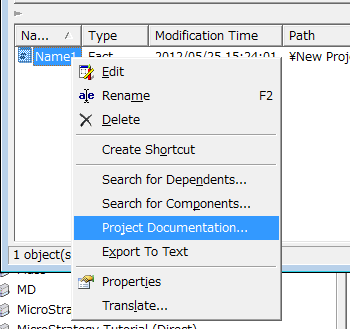
  • Right-click the fact in search dialog and select the menu 'Project Documentation...', as shown in the image below:
     
ka02R000000kbxKQAQ_0EM440000002DEi.png
  • When Project Documentation Wizard process finishes, open the HTML output.
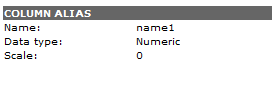
  • Note that the property "Precision" is not displayed on Column Alias page, as shown in the image below:
     
ka02R000000kbxKQAQ_0EM440000002DEe.png

CAUSE:
This is a known issue with Strategy.
 
ACTION:
Strategy will continue to investigate and post updates as soon as they are available.


Comment

0 comments

Details

Knowledge Article

Published:

June 5, 2017

Last Updated:

June 5, 2017