EducationSoftwareStrategy.com
StrategyCommunity

Knowledge Base

Product

Community

Knowledge Base

TopicsBrowse ArticlesDeveloper Zone

Product

Download SoftwareProduct DocumentationSecurity Hub

Education

Tutorial VideosSolution GalleryEducation courses

Community

GuidelinesGrandmastersEvents
x_social-icon_white.svglinkedin_social-icon_white.svg
Strategy logoCommunity

© Strategy Inc. All Rights Reserved.

LegalTerms of UsePrivacy Policy
  1. Home
  2. Topics

KB40233: "There should be at least ten input records in the training data" error message appears when viewing Predictive Model of Decision Tree in MicroStrategy Data Mining Services 9.4.1.


Community Admin

• Strategy


"There should be at least ten input records in the training data" error message appears when viewing Predictive Model of Decision Tree in MicroStrategy Data Mining Services 9.4.1.

SYMPTOM:
 
When viewing Predictive Model of Decision Tree in Strategy Data Mining Services 9.4.1, the following error occurs:
 

ka04W000000OhAdQAK_0EM440000002DDg.png


Sample Code/Error
This model is not viewable
 
Due to a technical issue, it was not possible to create a model. There should be at least ten input records in the training data.
 
This model has been designated by its producer as a Non-Scoring Model. This means that, while the PMML may contain valuable descriptive information about the model creation process, it does not contain a model worthy of deployment for scoring.
 
 
STEPS TO REPRODUCE: 
 
Follow these steps below to reproduce this issue with Strategy Tutorial project.
 

  • Create a metric MaxMonth with the expression "Max(Month)"
  • Build a training Metric of Decision Tree analysis, using ‘MaxMonth’ as Independent metrics and metric ‘Cost’ as Dependent metrics, as shown below. Set the variable type of ‘Max(Month){~}’ as ‘Categorical’ in advanced setting.
  • Create a report with attribute Month, metric Cost and the training metric, as shown below:
     
  • Run the report and right click the Predictive metric to View Predictive Model, as shown below:
     
  • "This model is not viewable" error message occurs as shown above.
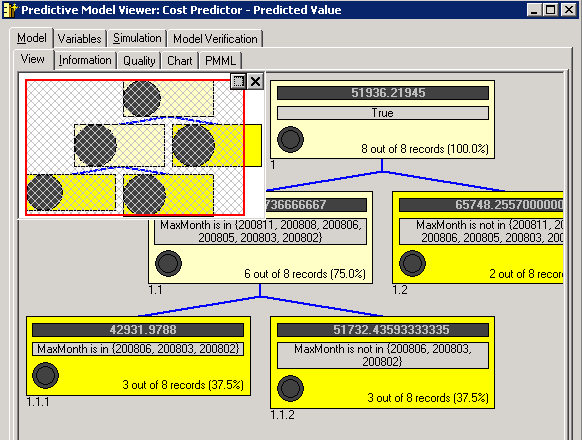
  • Create a report with attribute Month, metric Cost and the training metric. Add an attribute element list filter in the report to reduce the number of month elements to 12.
  • Run the report, as shown below:                                                                                     
ka04W000000OhAdQAK_0EM440000002DDR.png
  • Right click the Predictive metric to View Predictive Model, as shown below:                               
ka04W000000OhAdQAK_0EM440000002DDe.png


CAUSE:
 
This is a known issue in Strategy Data Mining Services 9.4.1.
 
ACTION:
Strategy will continue to investigate and post updates as soon as they are available.
 
 
WORKAROUND:
 
Add a report filter to reduce the number of attribute elements for Variables. 


Comment

0 comments

Details

Knowledge Article

Published:

June 1, 2017

Last Updated:

June 1, 2017