EducationSoftwareStrategy.com
StrategyCommunity

Knowledge Base

Product

Community

Knowledge Base

TopicsBrowse ArticlesDeveloper Zone

Product

Download SoftwareProduct DocumentationSecurity Hub

Education

Tutorial VideosSolution GalleryEducation courses

Community

GuidelinesGrandmastersEvents
x_social-icon_white.svglinkedin_social-icon_white.svg
Strategy logoCommunity

© Strategy Inc. All Rights Reserved.

LegalTerms of UsePrivacy Policy
  1. Home
  2. Topics

KB40239: Unable to edit the Intelligent Cube which is published via Data Import in MicroStrategy Developer 9.x and 10.x


Stefan Zepeda

Salesforce Solutions Architect • Strategy


Unable to edit the Intelligent Cube which is published via Data Import in MicroStrategy Developer 9.x and 10.x

SYMPTOM:
 
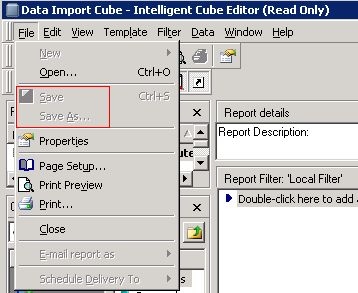
The "Save" and "Save As" options are grayed out when trying to save the Intelligent Cube which is published via Data Import in Strategy Developer 9.x and 10.x, as shown below:
 

ka02R000000kUknQAE_0EM4400000029lJ.jpeg

 
EXPLANATION:
 
It is an expected behavior.
When editing an Intelligent Cube which is published via Data Import, by default the Intelligent Cube Editor is opened in Read Only mode, any modification performed on top of the Intelligent Cube could not be saved.
 
Refer to below technical note for the best practices for Data Import:

  • KB34495: Best practices for Data Import in Strategy 9.x


Comment

0 comments

Details

Knowledge Article

Published:

June 3, 2017

Last Updated:

June 3, 2017