SYMPTOM
After installing Strategy 9.x on Windows 7 and tryinig to browse attribute elements through hierarchies in the Data Explorer, the following error message is shown:
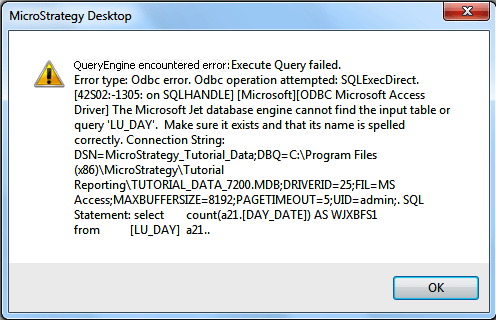
QueryEngine encountered error: Execute Query failed.
Error type Odbc error. Odbc operation attempted: SQLExecDirect.
The Microsoft Jet database engine cannot find the input table or query 'TABLE_XXX'. Make sure it exists and that its name is spelled correctly. Connection String:
DSN=Strategy_Tutorial_Data;DBQ=C:\Program Files (x86)\MicroStrategy\Tutorial Reporting\TUTORIAL_DATA_7200.MDB;DRIVERID=25;FIL=MS Access;MAXBUFFERSIZE=8192;PAGETIMEOUT=5;UID=admin;. SQL Statement: select count (a21.) AS WJXBFS1 from a21..
CAUSE
One possible cause for this issue is that, depending on the User Account Control (UAC) settings, the Windows 7 feature File Virtualization might be enabled and thus, a copy of the Microsoft Access warehouse in use is made to the folder C:\Users\<USERNAME>\AppData\Local\VirtualStore. Therefore, the local path configured for the standard DSN will not be valid anymore.
ACTION
Please, contact your Windows operating system administrator to have the File Virtualization feature disabled.
WORKAROUND
Reconfigure the warehouse DSN and point it to the database copied into the VirtualStore directory.
NOTE
Further information about File virtualization on Windows operating systems may be found in http://msdn.microsoft.com/en-us/library/bb756960.aspx.
